• Skip to main content
  • Skip to primary sidebar
  • Skip to footer

bVisual

  • Home
  • Services
    • How Visio smartness can help your business
    • Visio visual in Power BI
    • Visio Consulting Services
    • Visio Bureau Services
    • Visio Training and Support Services
  • Products
    • Visio Shape Report Converter
    • SS Plus
    • LayerManager
    • visViewer
    • Metro Icons
    • Rules Tools for Visio
    • The Visio 2010 Sessions App
    • Multi-Language Text for Visio
    • Document Imager for Visio
    • multiSelect for Visio
    • pdSelect for Visio
  • Case Studies
    • Case studies overview
    • Using Visio in Education for GIS
    • Visualizing Construction Project Schedules
    • Visio Online Business Process Mapping
    • Nexans Visio Template
    • CNEE Projects, WorldCom
    • Chase Manhattan Bank
  • News
    • Recent news
    • News archive
  • Resources
    • Articles➡
      • ShapeSheet Functions A-Z
      • Comparing Visio for the Web and Desktop
      • Customising Visio Shapes for the Web App
      • Key differences between the Visio desktop and web apps
      • Using the Visio Data Visualizer in Excel
      • Using Visio in Teams
      • Creating Visio Tabs and Apps for Teams with SharePoint Framework (SPFx)
      • Designing Power Automate Flows with Microsoft Visio
      • Innovative uses of Visio Lists
    • Webcasts ➡
      • Visio in Organizations
      • My session and other Visio sessions at MSIgnite 2019
      • Power up your Visio diagrams
      • Vision up your Visio diagrams
      • The Visio 2010 MVP Sessions
    • Visio Web Learning Resources
    • Books➡
      • Visualize Complex Processes with Microsoft Visio
      • Mastering Data Visualization with Microsoft Visio
      • Microsoft Visio Business Process Diagramming and Validation
      • Visualizing Information with Microsoft Visio
  • Blog
    • Browse blog articles
    • Visio Power BI articles
    • Visio for Web articles
    • A history of messaging and encryption
  • About us
    • About bVisual
    • Testimonials
    • Bio of David Parker
    • Contact Us
    • Website Privacy Policy
    • Website terms and conditions
    • Ariba Network

ShapeSheet Formulas

Published on May 27, 2015 by David Parker

Distributing Data Points Automatically on Maps in Visio

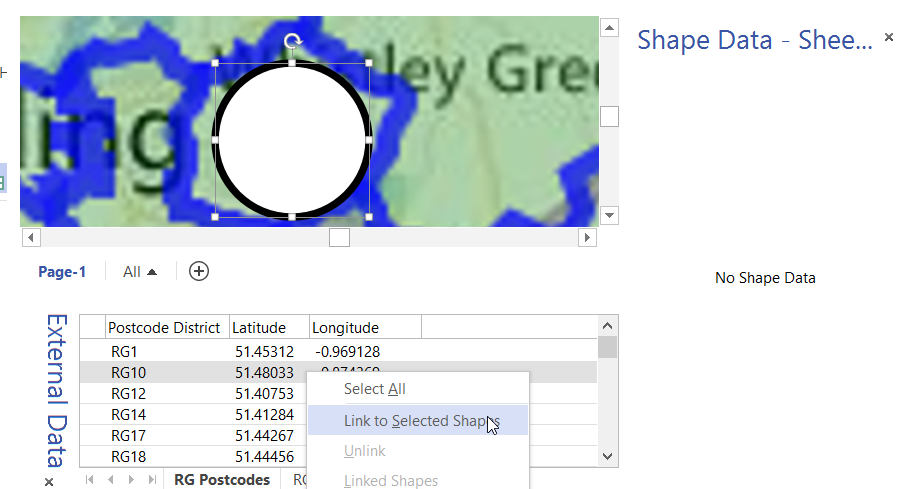
In my last article, I described how to calibrate a map in Visio ( see http://blog.bvisual.net/2015/05/26/calibrating-a-map-in-visio/ ), and in this article I use a calibrated map to distribute data points from a linked data source automatically.

For this example, I drew a simple shape at the size that I want, but you could add this smartness to any shape. All you need is an external data recordset that contains the Latitude and Longitude values that need to be linked to each data point.
image
[Read more…] about Distributing Data Points Automatically on Maps in Visio

Filed Under: Bing Maps, External Data, Geographic, Shape Data, ShapeSheet Formulas, Visio 2013 Tagged With: Link Data to Shapes, Shape Data, ShapeSheet Functions

Published on January 25, 2015 by David Parker

Using SharePoint Choice Columns with Visio Services

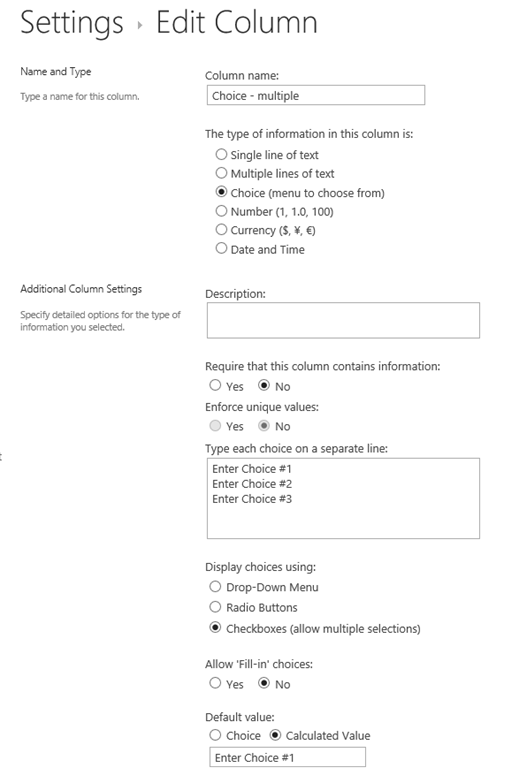
Back in March 2014, I wrote about mapping SharePoint Column Types to Visio Shape Data Types ( see http://blog.bvisual.net/2014/03/03/mapping-sharepoint-list-columns-to-visio-shape-data-types/ ), and I skipped over the remaining SharePoint column types that could not be directly mapped. I described Rich Text previously ( see http://blog.bvisual.net/2014/11/14/using-sharepoint-rich-text-multiple-line-columns-with-visio-services/ ), and in this article I describe some of the possibilities of using the SharePoint Choice column type.

There are three different options for Choice columns in SharePoint 2013, but only the third, Checkboxes, allows for multiple selections.
image
[Read more…] about Using SharePoint Choice Columns with Visio Services

Filed Under: External Data, Shape Data, ShapeSheet Formulas, SharePoint, Visio 2013 Tagged With: SharePoint 2013, Visio Services

Published on December 31, 2014 by David Parker

Get Scrabbled with Visio

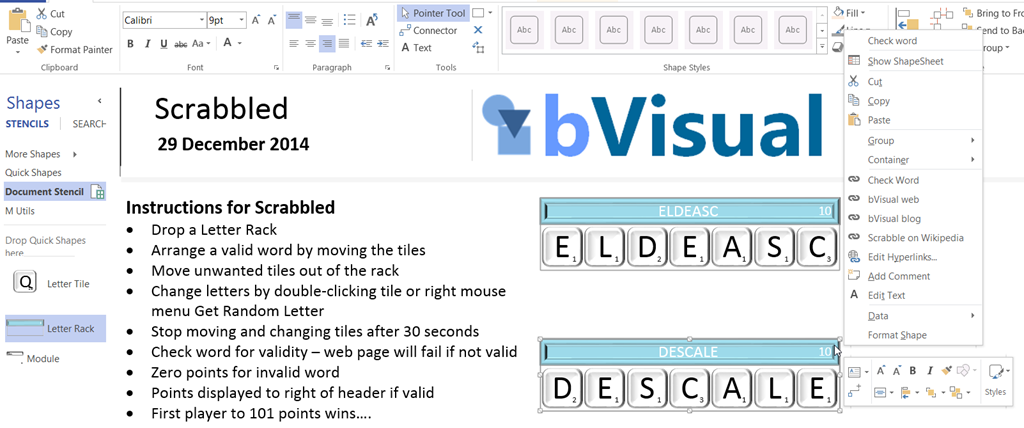
Last day of 2014, and the last of my word and number games in Visio … this is Scrabbled, which is a trainer for Scrabble. Okay, it was too difficult to do a fully working Scrabble board without code, and I was likely to break copyright if I did, so I invented a game with the Scrabble tile rack.

I have some suggested rules, but you can make your own up … I just wanted to see what I could do with just ShapeSheet functions..
image
[Read more…] about Get Scrabbled with Visio

Filed Under: Games, Lists, ShapeSheet Formulas, Visio 2013 Tagged With: Shape Data, ShapeSheet Functions

Published on December 29, 2014 by David Parker

How to play Yahtzee with Visio

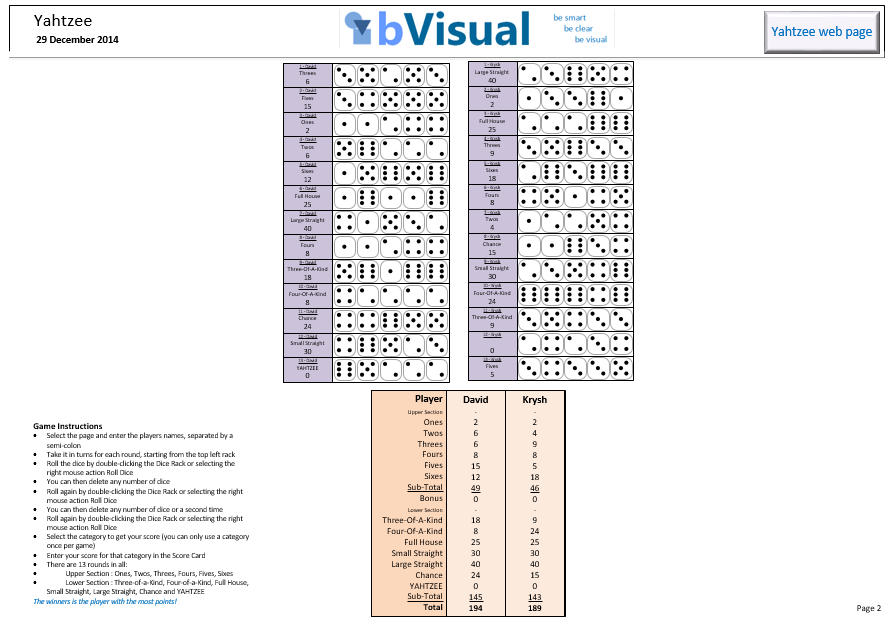
The holidays are almost over, so I now present my Yahtzee game in Visio just using ShapeSheet formulas …. no VBA or add-in! Pretty soon, I will have a whole compendium of games, but I think this is my most complete yet. Yahtzee is very similar to Poker Dice, but we used to play Yahtzee a lot as kids, so maybe I am regressing. Anyway, setting these games up in Visio demonstrates the power of the ShapeSheet functions, which is necessary for the creation of efficient Visio shapes. I have also made the Dice Racks into List containers that can only hold the Die List Item shapes.
image

[Read more…] about How to play Yahtzee with Visio

Filed Under: Lists, ShapeSheet Formulas, Visio 2013 Tagged With: Shape Data, ShapeSheet Functions

Published on December 3, 2014 by David Parker

A Visio Deck of Cards

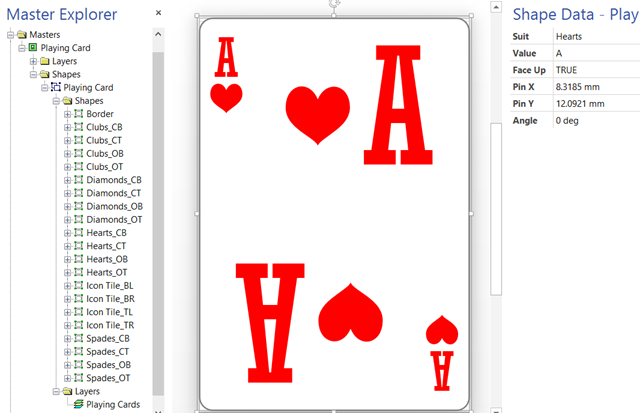
Sometimes I try ideas out in Visio without a specific goal in mind, and I have been creating a Visio deck of cards recently, so I thought I would share it. In fact, I have only created one card but it is capable of being any card in the deck by changing its shape data! I can even get a randomly generated card … all without any code except for formulas in the ShapeSheet.

Firstly, I used four icons for hearts, clubs, diamonds and spades, from my set of metro icons stencils ( see http://blog.bvisual.net/2012/11/20/announcing-metro-icons-and-a-windows-app-tile-shape-for-visio/ ). I decided to keep the icons for the suits separate, with four per suit, but linked their visibility to a Suit Shape Data fixed list row. I also displayed the Value Shape Data as the text of each icon.
image

I added a Face Up Shape Data row so that the suit and value are hidden by the Microsoft Office logo.

[Read more…] about A Visio Deck of Cards

Filed Under: Games, Lists, Shape Reports, ShapeSheet Formulas, Visio 2013 Tagged With: Link Data to Shapes, Shape Data, ShapeSheet Functions

Published on September 10, 2014 by David Parker

Union Jacked?

I am in Edinburgh, capital of Scotland, today. All talk is of the vote on Scottish independence next week … so, I thought I would make a Union Jack Visio shape that can be automatically changed, using Shape Data values, to represent the countries left in the union!

The Union Jack is comprised of the flags of England, Scotland and Ireland … sorry Wales, you are only a principality. Yes, I know that Northern Ireland is a province, but it was decided that St Patrick’s Saltire should be kept even after Eire got independence.

Note that a single country flag has an aspect ratio of 5:3, but a multi-country union flag has an aspect ratio of 2:1.

image
[Read more…] about Union Jacked?

Filed Under: Geographic, Shape Data, ShapeSheet Formulas, Visio Tagged With: Shape Data, ShapeSheet Functions

  • « Go to Previous Page
  • Page 1
  • Interim pages omitted …
  • Page 13
  • Page 14
  • Page 15
  • Page 16
  • Page 17
  • Interim pages omitted …
  • Page 19
  • Go to Next Page »

Primary Sidebar

  • LinkedIn
  • Twitter

Recent Posts

  • Creating Boolean Context Menus in Visio
  • Installing Visio Templates and Stencils
  • Creating a Dynamic connector master automatically
  • A visual exploration of Penrose Tiling in Visio
  • How SVG in Visio can cause a Shape.BoundingBox(…) error

Categories

Tags

Accessibility Add-Ins AdvancedInstaller Connectors Containers Data Export Data Graphics Data Import Data Visualizer Educational Excel GraphDatabase Hyperlinks Icon Sets JavaScript LayerManager Layers Legend Link Data to Shapes MSIgnite Office365 Org Chart PowerApps PowerBI PowerQuery Processes Setup and Deployment Shape Data Shape Design ShapeSheet ShapeSheet Functions SharePoint 2013 SQL Teams Validation VBA Video Visio Visio 2007 Visio for the desktop Visio for the Web Visio Online Visio Services Visio Viewer Webinar

Footer

bVisual Profile

The UK-based independent Visio consultancy with a worldwide reach. We have over 25 years experience of providing data visualization solutions to companies around the globe.

Learn more about bVisual

  • Amazon
  • E-mail
  • Facebook
  • LinkedIn
  • Twitter
  • YouTube

Search this website

Recent posts

  • Creating Boolean Context Menus in Visio
  • Installing Visio Templates and Stencils
  • Creating a Dynamic connector master automatically
  • A visual exploration of Penrose Tiling in Visio
  • How SVG in Visio can cause a Shape.BoundingBox(…) error

Copyright © 2026 · Executive Pro on Genesis Framework · WordPress · Log in