• Skip to main content
  • Skip to primary sidebar
  • Skip to footer

bVisual

  • Home
  • Services
    • How Visio smartness can help your business
    • Visio visual in Power BI
    • Visio Consulting Services
    • Visio Bureau Services
    • Visio Training and Support Services
  • Products
    • Visio Shape Report Converter
    • SS Plus
    • LayerManager
    • visViewer
    • Metro Icons
    • Rules Tools for Visio
    • The Visio 2010 Sessions App
    • Multi-Language Text for Visio
    • Document Imager for Visio
    • multiSelect for Visio
    • pdSelect for Visio
  • Case Studies
    • Case studies overview
    • Using Visio in Education for GIS
    • Visualizing Construction Project Schedules
    • Visio Online Business Process Mapping
    • Nexans Visio Template
    • CNEE Projects, WorldCom
    • Chase Manhattan Bank
  • News
    • Recent news
    • News archive
  • Resources
    • Articles➡
      • ShapeSheet Functions A-Z
      • Comparing Visio for the Web and Desktop
      • Customising Visio Shapes for the Web App
      • Key differences between the Visio desktop and web apps
      • Using the Visio Data Visualizer in Excel
      • Using Visio in Teams
      • Creating Visio Tabs and Apps for Teams with SharePoint Framework (SPFx)
      • Designing Power Automate Flows with Microsoft Visio
      • Innovative uses of Visio Lists
    • Webcasts ➡
      • Visio in Organizations
      • My session and other Visio sessions at MSIgnite 2019
      • Power up your Visio diagrams
      • Vision up your Visio diagrams
      • The Visio 2010 MVP Sessions
    • Visio Web Learning Resources
    • Books➡
      • Visualize Complex Processes with Microsoft Visio
      • Mastering Data Visualization with Microsoft Visio
      • Microsoft Visio Business Process Diagramming and Validation
      • Visualizing Information with Microsoft Visio
  • Blog
    • Browse blog articles
    • Visio Power BI articles
    • Visio for Web articles
    • A history of messaging and encryption
  • About us
    • About bVisual
    • Testimonials
    • Bio of David Parker
    • Contact Us
    • Website Privacy Policy
    • Website terms and conditions
    • Ariba Network

Shape Design

Published on March 17, 2008 by David Parker

Using Fill Patterns with DataGraphic Color By Value

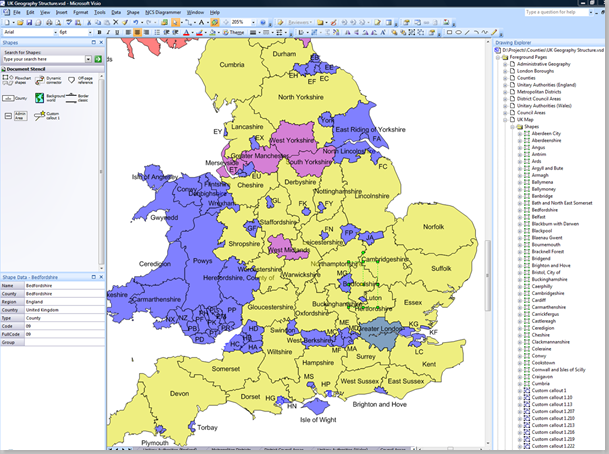
Microsoft Office Visio 2007 Professional provides the ability to color shapes by different values in selected cells.  This is great, but just how many color variations can your eyes detect?  If you have lots of different values, then the color by value automatically produced colors can look too similar to be able to distinguish them apart. In this article, I propose a method of automatically assigning different fill patterns to similar colors so that they can be visually separated.
[Read more…] about Using Fill Patterns with DataGraphic Color By Value

Filed Under: Color, Visio

Published on December 10, 2007 by David Parker

Creating PolyLines From Existing Shapes in Visio

A couple of posts in the Visio newsgroups got me thinking this weekend.  One was from an Autocad conversant user who would prefer Visio to draw a continuous line between points rather than doing the normal click, hold and drag with line tool because he has tendonitis; and the other wanted to draw a circle centered on a vertex because he is drawing land boundaries.

Visio has a PolyLine line type, but, as far as I am aware, it can only be created in code – there is no menu or toolbar button to enable you to use it.  It was introduced for converting CAD lines, and is simply a series of X and Y co-ordinates in a single cell, rather than the normal co-ordinate per row.
[Read more…] about Creating PolyLines From Existing Shapes in Visio

Filed Under: ShapeSheet Formulas, VBA, Visio

Published on November 15, 2007 by David Parker

Importing Hyperlinks into Visio Shapes

Visio shapes can have multiple hyperlinks, but it can be a chore to add them with the Insert / Hyperlinks … command.  Fortunately, Visio 2007 Professional has the Data / Link Data to Shapes … command.

If you were to have a data source, such as an Excel spreadsheet, that contains hyperlinks (see the example below)…

ExcelHyperlinks
[Read more…] about Importing Hyperlinks into Visio Shapes

Filed Under: External Data, Hyperlinks, ShapeSheet Formulas, Visio

Published on November 11, 2007 by David Parker

Finding a Row in a Visio DataRecordset

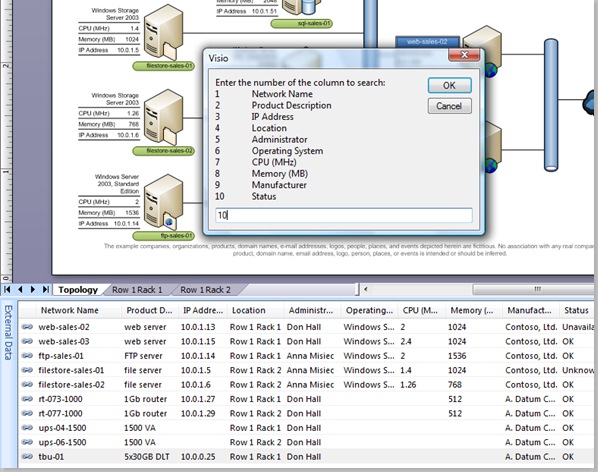
A recent newsgroup post asked how to find a row in a Visio DataRecordset for a given criteria.  Well, I have used the IT Asset Management sample in Visio 2007 Professional to demonstrate how this can be done with a VBA function.

Of course, you may wish to improve the user interface because I limited myself to using an InputBox, and I have assumed that there is only one column defining the primary key of the DataRecordset.

The sub function, FindRow, listed below first checks whether the External Data window is open, and then gets the active DataRecordset.  The code then reads the columns of the DataRecordset and prompts for a selection of the number of the column that you wish to search for a value in.

image
[Read more…] about Finding a Row in a Visio DataRecordset

Filed Under: External Data, VBA, Visio

Published on November 5, 2007 by David Parker

A Working Visio Clock

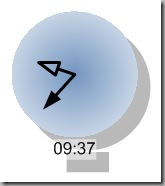
A recent newsgroup post asked about the ShapeSheet programming of lines in Visio to represent the hands of a clock.  Well, it made me think, so here is my solution of a clock in Visio with just the ShapeSheet, and, for good measure, you can set it to refresh every minute!

image
[Read more…] about A Working Visio Clock

Filed Under: ShapeSheet Formulas, Visio

Published on October 8, 2007 by David Parker

Toggling Layers On and Off

UPDATE March 2017 : I have now expanded this functionality into an add-in for Visio (see Layer Manager add-in for Visio released ).

Visio layering system is more complex than any CAD system I’ve worked with, and often catches users out.  A Visio shape can belong to no layer, one layer or multiple layers simultaneously, and a layer can be visible or invisible; printable or non-printable.  In fact, you can have a shape on a layer that is invisible but printable – a good way to put a watermark across a document.

Firstly, Visio layers are per page in a document, and secondly, Visio layers are stored as an index number with an associated name.  Therefore, layer 1 on page 1 could be named Outline, but layer 1 on page 2 could be called something completely different!

View > Layer Properties will show you the layer settings on the active Visio page, but the # column, which gives you a count of shapes on each layer, can be misleading because the same shape can be on multiple layers, and even sub-shapes (those inside a grouped shape) are counted.

image
[Read more…] about Toggling Layers On and Off

Filed Under: Layers, VBA, Visio

  • « Go to Previous Page
  • Page 1
  • Interim pages omitted …
  • Page 33
  • Page 34
  • Page 35
  • Page 36
  • Go to Next Page »

Primary Sidebar

  • LinkedIn
  • Twitter

Recent Posts

  • Installing Visio Templates and Stencils
  • Creating a Dynamic connector master automatically
  • A visual exploration of Penrose Tiling in Visio
  • How SVG in Visio can cause a Shape.BoundingBox(…) error
  • Post-Processing Paste from Clipboard in Visio

Categories

Tags

Accessibility Add-Ins AdvancedInstaller Connectors Containers Data Export Data Graphics Data Import Data Visualizer Educational Excel GraphDatabase Hyperlinks Icon Sets JavaScript LayerManager Layers Legend Link Data to Shapes MSIgnite Office365 Org Chart PowerApps PowerBI PowerQuery Processes Setup and Deployment Shape Data Shape Design ShapeSheet ShapeSheet Functions SharePoint 2013 SQL Teams Validation VBA Video Visio Visio 2007 Visio for the desktop Visio for the Web Visio Online Visio Services Visio Viewer Webinar

Footer

bVisual Profile

The UK-based independent Visio consultancy with a worldwide reach. We have over 25 years experience of providing data visualization solutions to companies around the globe.

Learn more about bVisual

  • Amazon
  • E-mail
  • Facebook
  • LinkedIn
  • Twitter
  • YouTube

Search this website

Recent posts

  • Installing Visio Templates and Stencils
  • Creating a Dynamic connector master automatically
  • A visual exploration of Penrose Tiling in Visio
  • How SVG in Visio can cause a Shape.BoundingBox(…) error
  • Post-Processing Paste from Clipboard in Visio

Copyright © 2026 · Executive Pro on Genesis Framework · WordPress · Log in