• Skip to main content
  • Skip to primary sidebar
  • Skip to footer

bVisual

  • Home
  • Services
    • How Visio smartness can help your business
    • Visio visual in Power BI
    • Visio Consulting Services
    • Visio Bureau Services
    • Visio Training and Support Services
  • Products
    • Visio Shape Report Converter
    • SS Plus
    • LayerManager
    • visViewer
    • Metro Icons
    • Rules Tools for Visio
    • The Visio 2010 Sessions App
    • Multi-Language Text for Visio
    • Document Imager for Visio
    • multiSelect for Visio
    • pdSelect for Visio
  • Case Studies
    • Case studies overview
    • Using Visio in Education for GIS
    • Visualizing Construction Project Schedules
    • Visio Online Business Process Mapping
    • Nexans Visio Template
    • CNEE Projects, WorldCom
    • Chase Manhattan Bank
  • News
    • Recent news
    • News archive
  • Resources
    • Articles➡
      • ShapeSheet Functions A-Z
      • Comparing Visio for the Web and Desktop
      • Customising Visio Shapes for the Web App
      • Key differences between the Visio desktop and web apps
      • Using the Visio Data Visualizer in Excel
      • Using Visio in Teams
      • Creating Visio Tabs and Apps for Teams with SharePoint Framework (SPFx)
      • Designing Power Automate Flows with Microsoft Visio
      • Innovative uses of Visio Lists
    • Webcasts ➡
      • Visio in Organizations
      • My session and other Visio sessions at MSIgnite 2019
      • Power up your Visio diagrams
      • Vision up your Visio diagrams
      • The Visio 2010 MVP Sessions
    • Visio Web Learning Resources
    • Books➡
      • Visualize Complex Processes with Microsoft Visio
      • Mastering Data Visualization with Microsoft Visio
      • Microsoft Visio Business Process Diagramming and Validation
      • Visualizing Information with Microsoft Visio
  • Blog
    • Browse blog articles
    • Visio Power BI articles
    • Visio for Web articles
    • A history of messaging and encryption
  • About us
    • About bVisual
    • Testimonials
    • Bio of David Parker
    • Contact Us
    • Website Privacy Policy
    • Website terms and conditions
    • Ariba Network

Shape Design

Published on March 3, 2014 by David Parker

Mapping SharePoint List Columns to Visio Shape Data Types

The shape data in Visio 2013 diagrams can be linked to many external data sources, and one of the most useful is a SharePoint List. However, the Shape Data rows have a smaller number of expected data types than the column types that are available in SharePoint. This article begins an exploration of the mapping of SharePoint list column types to Visio data types.

The Type cell of a Shape Data row defines the data type, which is a number from 0 to 7, that is stored in that row.

Data TypeDescription
0String
1Fixed List
2Number
3Boolean
4Variable List
5Date or Time
6Duration
7Currency

The Format cell can modify the display of Value, or can provide the option values for the two list types.

[Read more…] about Mapping SharePoint List Columns to Visio Shape Data Types

Filed Under: Shape Data, SharePoint 2013, Visio, Visio 2013 Tagged With: Visio Services

Published on November 28, 2013 by David Parker

New Visio book out now!

After the trip to Hyderabad for the Visio MVP Conference, as described in my previous post, my wife and I went to Bangalore, Vadodara, and Mumbai. This gave me the chance to drop-in on Packt Publishing because this is the week that my new book is published ( see http://www.packtpub.com/microsoft-visio-2013-business-process-diagramming-and-validation/book ). The book’s title is Microsoft Visio 2013 Business Process Diagramming and Validation, and, although this is an update to my 2010 book (with an extra chapter for integration with Office365 and SharePoint 2013), it should resonate with a wider audience because Microsoft decided to merge the Premium and Professional editions into one Professional edition for Visio 2013, so that it now includes Visio Services and Validation. This means that there are millions more Visio users who can take advantage of validation rules to ensure that they have well-constructed diagrams in Visio. I would also like to stress that validation rules can be applied to all types of diagrams, not just process diagrams, and I will demonstrate this over the next few months here.

8002EN
[Read more…] about New Visio book out now!

Filed Under: Books, Validation, Visio 2013 Tagged With: Validation, Visio Rules, Visio Services

Published on June 18, 2013 by David Parker

Comparison of Visio Save As Web Outputs

SharePoint 2013 Visio Services provides a great solution for viewing the actual Visio file directly within a SharePoint web page, however you need to be logged into your corporate web to do this. So, how can you view Visio files in a web page if you cannot use Visio Services?

You could build a web page with the Visio Viewer control, but that is ActiveX and will only work in certain controlled conditions. The benchmark has to be allowing the Visio file to be viewed on an iPad, or an Android tablet, or Surface RT. Visio Services in SharePoint 2013 will enable this, and will allow for the Visio document to be zoomed, panned, and the Shape Data and hyperlinks to be viewed and used, but, again, this is not always available.

[Read more…] about Comparison of Visio Save As Web Outputs

Filed Under: Layers, Save As, Visio 2013 Tagged With: Html, Web

Published on May 21, 2013 by David Parker

Getting the Name of Glued Connection Points

A Visio developer asked me if it is possible to get the name of connection points that a connector is glued to in Visio. Well, it is not possible directly from the ShapeSheet, but is easy if you use a little code.

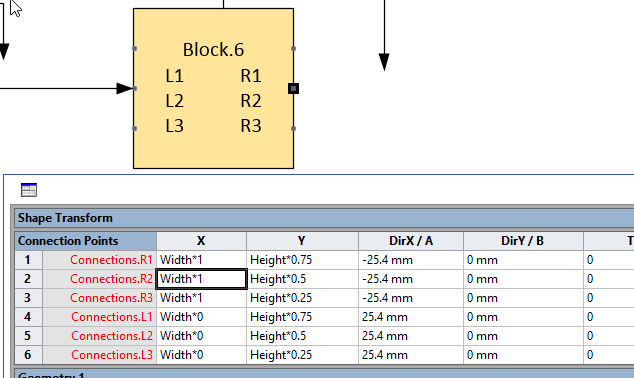
First of all, I created a simple Block shape with 3 named connection points on either side of it. I added a little text to the block to display the shape name, and to remind me where the named connection points are.


image


[Read more…] about Getting the Name of Glued Connection Points

Filed Under: Connections, Connectors, VBA, Visio 2010, Visio 2013 Tagged With: Connectors, Visio

Published on November 20, 2012 by David Parker

Announcing Metro Icons and a Windows App Tile Shape for Visio

My last two blogs have been about how I managed to convert XAML icon shapes into native Visio masters. Well, I have now converted all of Syncfusion’s Metro Studio 2 (now 5) shapes, and got their permission to release my own version of them. See Products/MetroIcons for more information.

MetroIcons
[Read more…] about Announcing Metro Icons and a Windows App Tile Shape for Visio

Filed Under: Metro Icons, Shape Design, Visio, Visio 2013 Tagged With: Icon Sets, Icons

Published on November 3, 2012 by David Parker

US Election Special–Vector Visio 2003 – 2010 Icons

Following on from my previous post, http://blog.bvisual.net/2012/11/02/us-election-special-vector-visio-2013-icons/, I have saved the stencil that was generated in Visio 2013 back to Visio 2003 – 2010 format … and, guess what? All of the new Bezier Curves got automatically translated to Nurbs, which means they work! (Except for themes … but they can be coloured)

image

They can be downloaded from : tp://sdrv.ms/TlzoEB

Perhaps someone would like to make Data Graphic icons from them ? : http://blog.bvisual.net/2012/04/19/make-your-own-visio-data-graphic-icons-sets-automatically/

Filed Under: Data Graphics, Visio, Visio 2010 Tagged With: Data Graphics, Icon Sets, Icons, Visio 2007

  • « Go to Previous Page
  • Page 1
  • Interim pages omitted …
  • Page 25
  • Page 26
  • Page 27
  • Page 28
  • Page 29
  • Interim pages omitted …
  • Page 36
  • Go to Next Page »

Primary Sidebar

  • LinkedIn
  • Twitter

Recent Posts

  • My Visio Books and Old pre-C# Work
  • Migrating from Lucidchart to Visio?
  • Creating Boolean Context Menus in Visio
  • Installing Visio Templates and Stencils
  • Creating a Dynamic connector master automatically

Categories

Tags

Accessibility Add-Ins AdvancedInstaller Connectors Containers Data Export Data Graphics Data Import Data Visualizer Educational Excel GraphDatabase Hyperlinks Icon Sets JavaScript LayerManager Layers Legend Link Data to Shapes MSIgnite Office365 Org Chart PowerApps PowerBI PowerQuery Processes Setup and Deployment Shape Data Shape Design ShapeSheet ShapeSheet Functions SharePoint 2013 SQL Teams Validation VBA Video Visio Visio 2007 Visio for the desktop Visio for the Web Visio Online Visio Services Visio Viewer Webinar

Footer

bVisual Profile

The UK-based independent Visio consultancy with a worldwide reach. We have over 25 years experience of providing data visualization solutions to companies around the globe.

Learn more about bVisual

  • Amazon
  • E-mail
  • Facebook
  • LinkedIn
  • Twitter
  • YouTube

Search this website

Recent posts

  • My Visio Books and Old pre-C# Work
  • Migrating from Lucidchart to Visio?
  • Creating Boolean Context Menus in Visio
  • Installing Visio Templates and Stencils
  • Creating a Dynamic connector master automatically

Copyright © 2026 · Executive Pro on Genesis Framework · WordPress · Log in