• Skip to main content
  • Skip to primary sidebar
  • Skip to footer

bVisual

  • Home
  • Services
    • How Visio smartness can help your business
    • Visio visual in Power BI
    • Visio Consulting Services
    • Visio Bureau Services
    • Visio Training and Support Services
  • Products
    • Visio Shape Report Converter
    • SS Plus
    • LayerManager
    • visViewer
    • Metro Icons
    • Rules Tools for Visio
    • The Visio 2010 Sessions App
    • Multi-Language Text for Visio
    • Document Imager for Visio
    • multiSelect for Visio
    • pdSelect for Visio
  • Case Studies
    • Case studies overview
    • Using Visio in Education for GIS
    • Visualizing Construction Project Schedules
    • Visio Online Business Process Mapping
    • Nexans Visio Template
    • CNEE Projects, WorldCom
    • Chase Manhattan Bank
  • News
    • Recent news
    • News archive
  • Resources
    • Articles➡
      • ShapeSheet Functions A-Z
      • Comparing Visio for the Web and Desktop
      • Customising Visio Shapes for the Web App
      • Key differences between the Visio desktop and web apps
      • Using the Visio Data Visualizer in Excel
      • Using Visio in Teams
      • Creating Visio Tabs and Apps for Teams with SharePoint Framework (SPFx)
      • Designing Power Automate Flows with Microsoft Visio
      • Innovative uses of Visio Lists
    • Webcasts ➡
      • Visio in Organizations
      • My session and other Visio sessions at MSIgnite 2019
      • Power up your Visio diagrams
      • Vision up your Visio diagrams
      • The Visio 2010 MVP Sessions
    • Visio Web Learning Resources
    • Books➡
      • Visualize Complex Processes with Microsoft Visio
      • Mastering Data Visualization with Microsoft Visio
      • Microsoft Visio Business Process Diagramming and Validation
      • Visualizing Information with Microsoft Visio
  • Blog
    • Browse blog articles
    • Visio Power BI articles
    • Visio for Web articles
    • A history of messaging and encryption
  • About us
    • About bVisual
    • Testimonials
    • Bio of David Parker
    • Contact Us
    • Website Privacy Policy
    • Website terms and conditions
    • Ariba Network

Shape Design

Published on August 28, 2012 by David Parker

Checking a Visio Shape for Cell Errors

I have been analysing a client’s Visio shapes recently to find out how to increase their performance. These shapes have numerous cells with ShapeSheet functions that reference other cells in the same shape, in parent shapes, in the page and in the document. I suspected that there may be some formulas producing erroneous results, so I wanted to write a macro to check if there are any cell formula evaluation errors in the shape, or its sub-shapes.

A Visio Cell object has an Error property that returns the error code generated by the last evaluation of the result.  See http://msdn.microsoft.com/en-us/library/office/ff767327.aspx for more information about the the Error property, and http://msdn.microsoft.com/en-us/library/office/ff766442.aspx for the VisCellError constants.

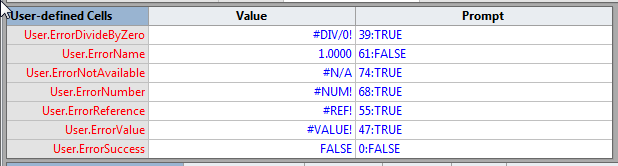
In order to test a macro that can check a shape for errors, I fist needed to generate examples of each possible error in a shape. So, I created a User-defined Cells section with seven rows – one for each possible VisCellError code value.
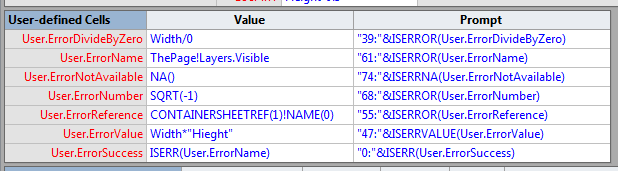
image

I was able to generate errors in all rows, except for the VisErrorName row. No matter how hard I tried, I could not get Visio to generate this error. I am fairly certain that I could generate errors (accidently) before Visio 2010, but I think that Microsoft have made this error much rarer because of the way they substitute last known values when a referenced cell or row is deleted.
image

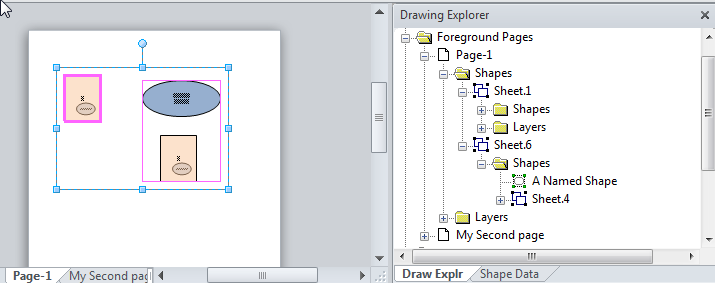
So, now that I had a shape with errors, I then duplicated it, and made the duplicate copy part of a grouped shape. This way I could test my function, CheckForErrors(), which simply iterates through all of the selected shapes, and their sub-shapes, and prints out any cells with errors into the Immediate Window:
image

My macro printed out the following table:

image

So, I can now check any shape to see if it has any cell errors within it.

The VBA code that produced the listing is :

Public Sub CheckForErrors()
Dim shp As Visio.Shape
    Debug.Print Now()
    Debug.Print "Parent.Name", "Shape.Name", "Section", "Row", "Column", "Name", "Error", "Formula"
    For Each shp In Visio.ActiveWindow.Selection
        CheckShapeForErrors shp
    Next
End Sub

Private Sub CheckShapeForErrors(ByVal shp As Visio.Shape)
Dim shpSub As Visio.Shape
Dim iSect As Integer
Dim iCol As Integer
Dim iRow As Integer
Dim cel As Visio.Cell
    For iSect = visSectionFirst + 1 To Visio.visSectionLast
        For iRow = 0 To shp.RowCount(iSect) - 1
            For iCol = 0 To shp.RowsCellCount(iSect, iRow) - 1
                Set cel = shp.CellsSRC(iSect, iRow, iCol)
                If cel.Error <> VisCellError.visErrorSuccess Then
                    Debug.Print cel.Shape.Parent.Name, cel.Shape.Name, iSect, iRow, iCol, cel.Name, cel.Error, cel.Formula
                End If
            Next iCol
        Next iRow
    Next iSect

    For Each shpSub In shp.Shapes
        CheckShapeForErrors shpSub
    Next
End Sub

I would be interested to find out of anyone who can create a VisErrorName for me!
Filed Under: ShapeSheet Formulas, Visio, Visio 2010, Visio 2013 Tagged With: ShapeSheet Functions

Published on July 30, 2012 by David Parker

Does Adobe Acrobat make better PDF files from Visio?

An export to PDF utility was freely available for Visio 2007, and was built in to Visio 2010. However, I have always been disappointed by the lack of support for Visio layers, Shape Data and multiple hyperlinks per shape in the PDF output. Microsoft have always told me that this is because they have limited control over the public PDF format, as opposed to the proprietary Adobe PDF format (These features are also surprisingly missing from the export to XPS tool, even though this format originated from Microsoft). So, the question is, does Adobe Acrobat make better PDF files from Visio than Microsoft’s free tool?

[Read more…] about Does Adobe Acrobat make better PDF files from Visio?

Filed Under: Save As, Visio 2010 Tagged With: PDF, Visio

Published on July 20, 2012 by David Parker

Multiple Selection Methods for Visio Diagrams

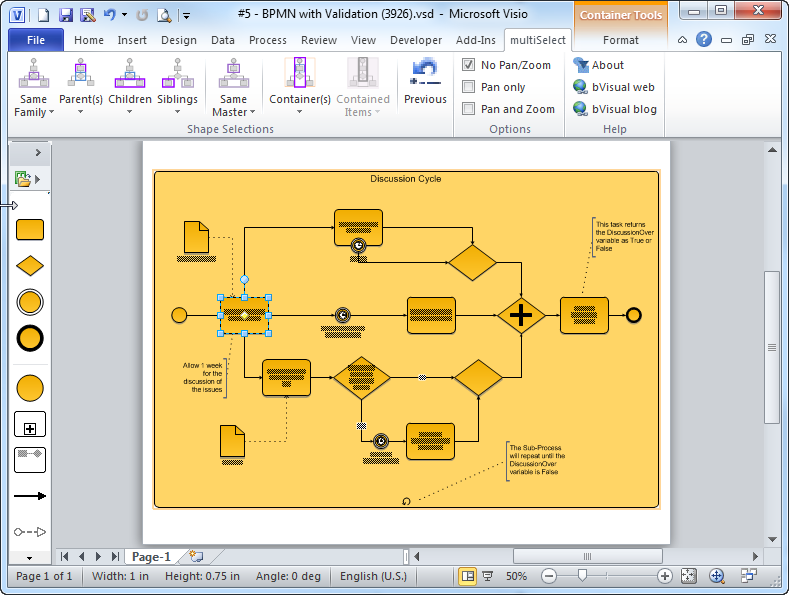
Much as I love using Visio, I have always felt that there are a few selection methods missing, and I often have to some extra buttons into solutions to make up for this. There are many types of diagrams that have shapes connected to each other, usually with a connector shape, and the user needs to be able to traverse these connections quickly and easily, so I have created a Visio 2010 add-in, multiSelect, that adds a lot of different selection methods that are accessible via an extra ribbon tab when ever a shape is selected.

SNAGHTMLe5023a1
[Read more…] about Multiple Selection Methods for Visio Diagrams

Filed Under: Containers, Selections, Visio 2010 Tagged With: Containers, Selecting Shapes, Visio 2013

Published on July 11, 2012 by David Parker

Selecting Nodes in Visio PivotDiagrams

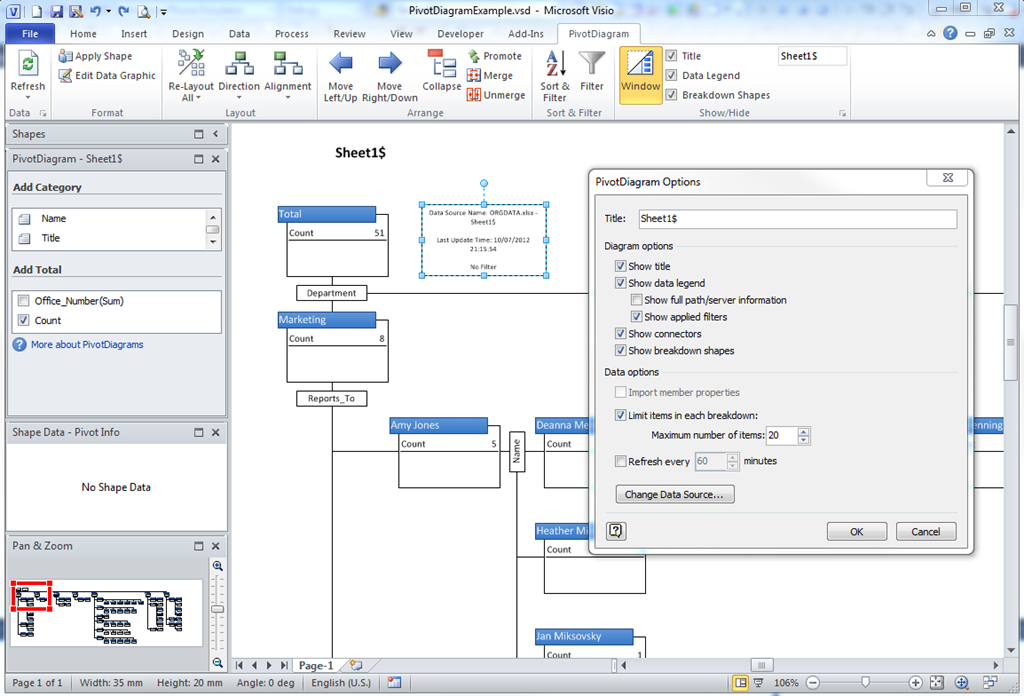
Microsoft Visio 2007 introduced PivotDiagrams to Visio Professional, and continues unchanged in Visio 2010 (see http://office.microsoft.com/en-us/visio-help/create-a-pivotdiagram-HA010357089.aspx ). These diagrams are a great way to analyse and visualize data by allowing you to breakdown data in a similar manner to PivotTables and PivotCharts in Excel. Any one who has both Microsoft Project and Visio installed will have seen that all of the extra diagram reports are in fact Visio PivotDiagrams. However, I have always found that selecting the nodes you want is difficult. In this article I will explain the problem and provide a solution … a new free add-in called PdSelect.

Update : Added new features 20 Jul 2012

In the following example PivotDiagram, I used the built-in OrgData Excel workbook as the data source. This example workbook is normally used to demonstrate the OrgChart Wizard, but I have used it to provide an alternative breakdown by Department / Reports_To / Name.

image
[Read more…] about Selecting Nodes in Visio PivotDiagrams

Filed Under: pdSelect, Selections, Visio 2010, Visio 2013 Tagged With: Data Graphics, PivotDiagrams

Published on May 8, 2012 by David Parker

Creating a Custom Org Chart Template with Extra Properties

A Visio user recently asked how to add a salary amount for an Org Chart person automatically, based on their selected Level. I thought it was a bit long to answer in the forum, so I have written my answer below. It demonstrates how you can have your own custom template that works with the Organization Chart add-on in Visio.

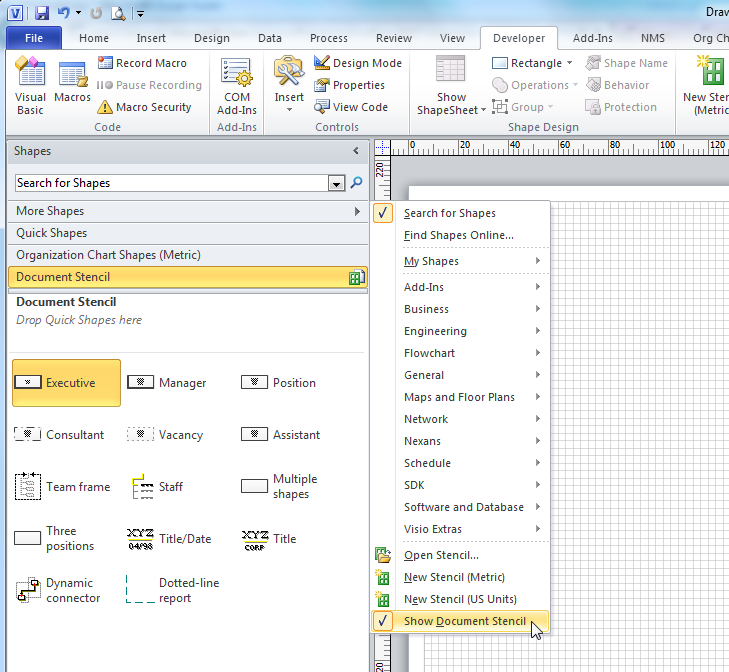
My approach to creating a custom template that still uses the Organization Chart Add-On is to create a new drawing from the built-in template, and then to add extra properties to it.

First, select Show Document Stencil to view all of the local copies of the built-in master shapes. If they are not there, then simply drag and drop them from the built-in stencil on to the first page, and then delete the shapes on the page. This will not delete the local copies of the masters.

image
[Read more…] about Creating a Custom Org Chart Template with Extra Properties

Filed Under: Org Charts, Shape Reports, ShapeSheet Formulas, VBA, Visio, Visio 2010 Tagged With: Org Chart

Published on April 26, 2012 by David Parker

Visio Date Format Pictures Affect Data Entry via the Calendar Popup

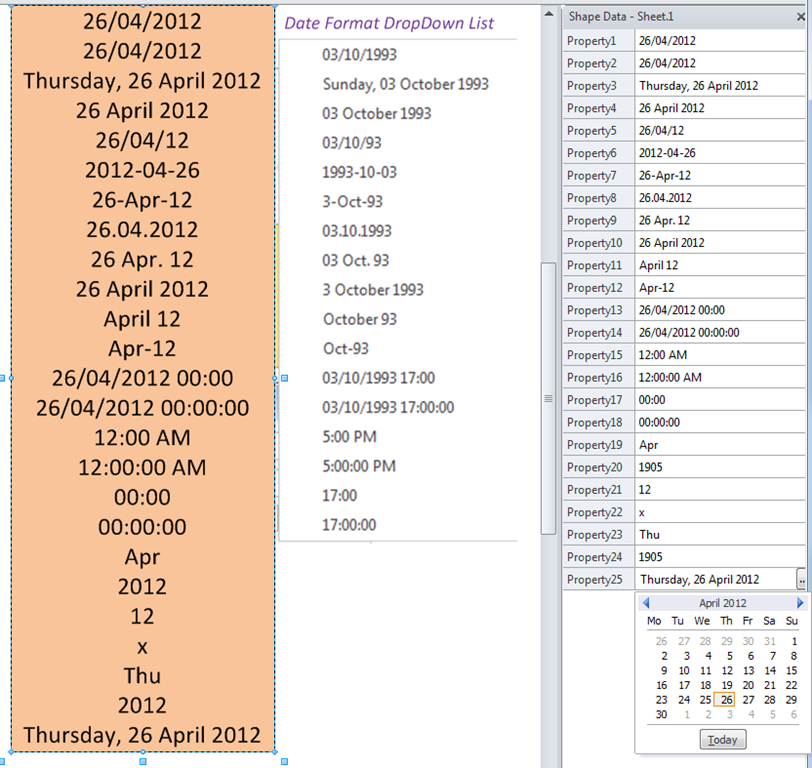
I have been creating roadmaps in Visio lately, and the client is only concerned with the months and years, so I thought it would be sensible to use a Date Format Picture to display only the month and year in the Shape Data window. What I did not expect is that the mere existence of this Date Format Picture would alter the actual date stored in the cell. In this blog, I layout my concerns about the Calendar popup that is provided for Date type Shape Data rows.

In the following example, I have created a shape, coloured pale orange below, and added 25 Date type Shape Data rows. I have not applied any format to Property1, but then I have applied each of the 17 suggested Date Format Patterns provided on a drop-down list in the Define Shape Data dialog. Finally, I added a further 7 patterns manually. I then selected Today as the value for every single Shape Data row:

image
[Read more…] about Visio Date Format Pictures Affect Data Entry via the Calendar Popup

Filed Under: ShapeSheet Formulas, Visio Tagged With: Dates, Visio 2007, Visio 2010

  • « Go to Previous Page
  • Page 1
  • Interim pages omitted …
  • Page 27
  • Page 28
  • Page 29
  • Page 30
  • Page 31
  • Interim pages omitted …
  • Page 36
  • Go to Next Page »

Primary Sidebar

  • LinkedIn
  • Twitter

Recent Posts

  • Introducing a free Visio Report Runner application
  • Protecting the integrity of custom Visio masters
  • Docked Stencils in Visio for the Web
  • My Visio Books and Old pre-C# Work
  • Migrating from Lucidchart to Visio?

Categories

Tags

Accessibility Add-Ins AdvancedInstaller Connectors Containers Data Export Data Graphics Data Import Data Visualizer Educational Excel GraphDatabase Hyperlinks Icon Sets JavaScript LayerManager Layers Legend Link Data to Shapes MSIgnite Office365 Org Chart PowerApps PowerBI PowerQuery Processes Setup and Deployment Shape Data Shape Design ShapeSheet ShapeSheet Functions SharePoint 2013 SQL Teams Validation VBA Video Visio Visio 2007 Visio for the desktop Visio for the Web Visio Online Visio Services Visio Viewer Webinar

Footer

bVisual Profile

The UK-based independent Visio consultancy with a worldwide reach. We have over 25 years experience of providing data visualization solutions to companies around the globe.

Learn more about bVisual

  • Amazon
  • E-mail
  • Facebook
  • LinkedIn
  • Twitter
  • YouTube

Search this website

Recent posts

  • Introducing a free Visio Report Runner application
  • Protecting the integrity of custom Visio masters
  • Docked Stencils in Visio for the Web
  • My Visio Books and Old pre-C# Work
  • Migrating from Lucidchart to Visio?

Copyright © 2026 · Executive Pro on Genesis Framework · WordPress · Log in