• Skip to main content
  • Skip to primary sidebar
  • Skip to footer

bVisual

  • Home
  • Services
    • How Visio smartness can help your business
    • Visio visual in Power BI
    • Visio Consulting Services
    • Visio Bureau Services
    • Visio Training and Support Services
  • Products
    • Visio Shape Report Converter
    • SS Plus
    • LayerManager
    • visViewer
    • Metro Icons
    • Rules Tools for Visio
    • The Visio 2010 Sessions App
    • Multi-Language Text for Visio
    • Document Imager for Visio
    • multiSelect for Visio
    • pdSelect for Visio
  • Case Studies
    • Case studies overview
    • Using Visio in Education for GIS
    • Visualizing Construction Project Schedules
    • Visio Online Business Process Mapping
    • Nexans Visio Template
    • CNEE Projects, WorldCom
    • Chase Manhattan Bank
  • News
    • Recent news
    • News archive
  • Resources
    • Articles➡
      • ShapeSheet Functions A-Z
      • Comparing Visio for the Web and Desktop
      • Customising Visio Shapes for the Web App
      • Key differences between the Visio desktop and web apps
      • Using the Visio Data Visualizer in Excel
      • Using Visio in Teams
      • Creating Visio Tabs and Apps for Teams with SharePoint Framework (SPFx)
      • Designing Power Automate Flows with Microsoft Visio
      • Innovative uses of Visio Lists
    • Webcasts ➡
      • Visio in Organizations
      • My session and other Visio sessions at MSIgnite 2019
      • Power up your Visio diagrams
      • Vision up your Visio diagrams
      • The Visio 2010 MVP Sessions
    • Visio Web Learning Resources
    • Books➡
      • Visualize Complex Processes with Microsoft Visio
      • Mastering Data Visualization with Microsoft Visio
      • Microsoft Visio Business Process Diagramming and Validation
      • Visualizing Information with Microsoft Visio
  • Blog
    • Browse blog articles
    • Visio Power BI articles
    • Visio for Web articles
    • A history of messaging and encryption
  • About us
    • About bVisual
    • Testimonials
    • Bio of David Parker
    • Contact Us
    • Website Privacy Policy
    • Website terms and conditions
    • Ariba Network

Diagram Types

Published on November 17, 2016 by David Parker

MS TechDays Sweden 2016 – Visio and SharePoint BPM portals

I am on my way home after presenting and demoing Visio and SharePoint BPM portals at Kistamassan near Stockholm. I was staying at the Scandic Victoria Tower right next door. Very handy, and very tall. It is a striking building, as can be seen in my photos below, however, speaking as an ex-architect, I was disappointed to find the modern interior spoilt by large, but inadequate, curtains that took several minutes to draw over the large number of triangular windows in my room. I really think it would have been worth installing electric auto-tinting glass.

[Read more…] about MS TechDays Sweden 2016 – Visio and SharePoint BPM portals

Filed Under: Process Flows, Visio 2016 Tagged With: BPMN

Published on October 30, 2016 by David Parker

US State Flags for Visio

I am working on a project where I thought the US State flags might be useful, so I quickly created a new master shape from the images in Wikipedia. The shape simply provides a selection of one of the states from the Shape Data window (plus one extra for the reverse of Oregon’s flag!).

The flag shape has a couple of Shape Data rows:

[Read more…] about US State Flags for Visio

Filed Under: Geographic, Shape Data, ShapeSheet Formulas, Visio 2016 Tagged With: Flag, US States

Published on April 14, 2016 by David Parker

Getting better value from your process diagrams with Visio 2016

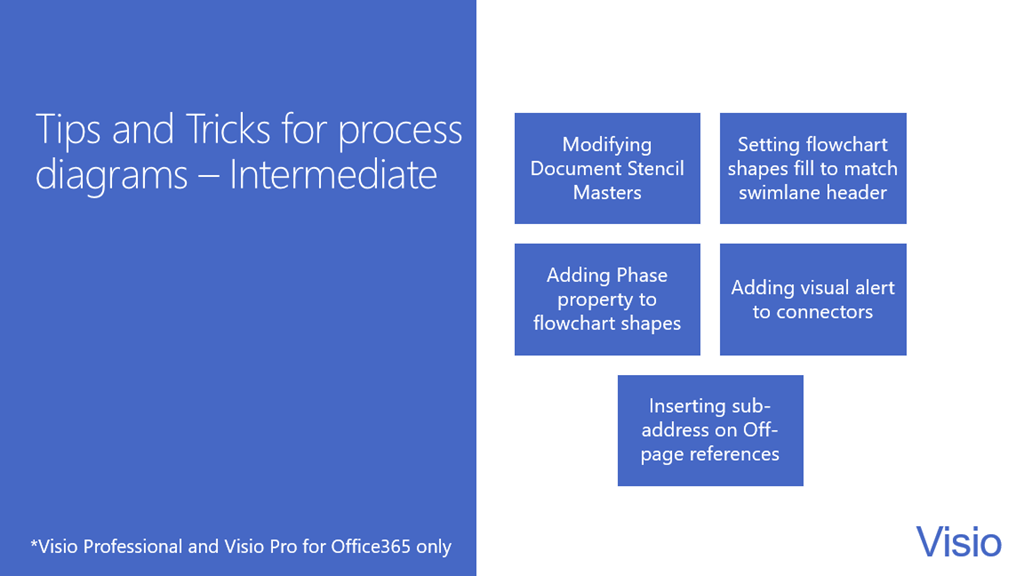
I will be presenting a one-hour webinar today at 1pm UK time entitled, Getting better value from your process diagrams with Visio 2016.

Process flow diagrams are amongst the most popular diagram types in Visio, but many users do not know some of the tips, tricks and techniques for getting the best out of Visio, in terms of productivity and efficiency.

This webinar covers understanding structured diagrams, enhancing shape data rows, hyperlinking, validation and exporting.

Follow this link to register : Microsoft Visio Webinar Series
image

Filed Under: Process Flows, Visio Tagged With: Educational, Processes, Shape Data, ShapeSheet Functions, Webinar

Published on May 27, 2015 by David Parker

Distributing Data Points Automatically on Maps in Visio

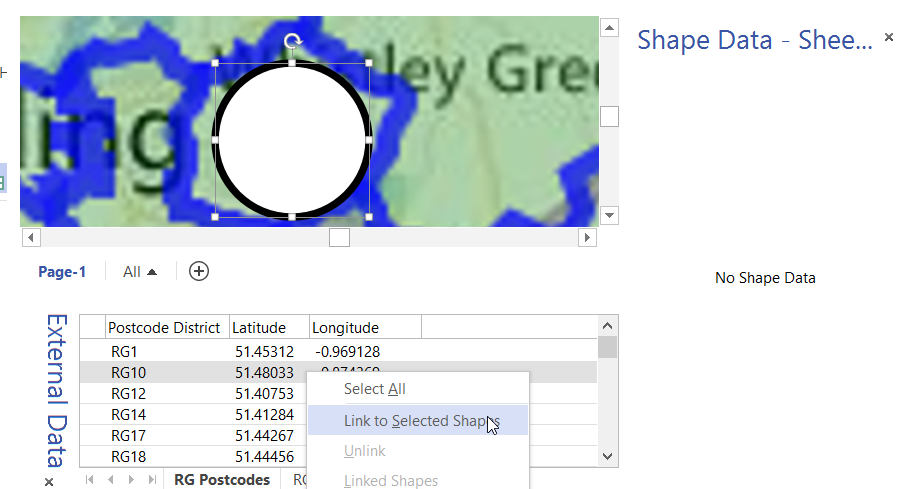
In my last article, I described how to calibrate a map in Visio ( see http://blog.bvisual.net/2015/05/26/calibrating-a-map-in-visio/ ), and in this article I use a calibrated map to distribute data points from a linked data source automatically.

For this example, I drew a simple shape at the size that I want, but you could add this smartness to any shape. All you need is an external data recordset that contains the Latitude and Longitude values that need to be linked to each data point.
image
[Read more…] about Distributing Data Points Automatically on Maps in Visio

Filed Under: Bing Maps, External Data, Geographic, Shape Data, ShapeSheet Formulas, Visio 2013 Tagged With: Link Data to Shapes, Shape Data, ShapeSheet Functions

Published on April 17, 2015 by David Parker

Visio Org Charts with Multiple Languages

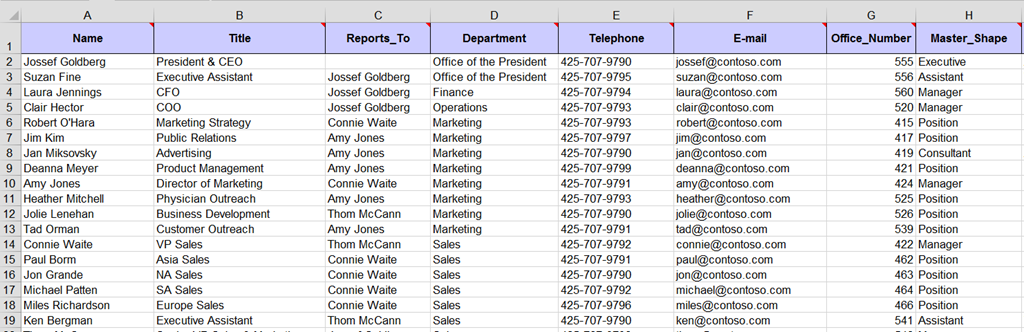
I had an enquiry recently about displaying Organisation Charts with text in different languages. This set me thinking, and, if you have Visio Professional, then you can use Link Data to Shapes to add this capability to existing diagrams, but Visio Standard users can just the Org Chart Wizard.

I will use the OrgData.xls file that is provided in the <Program Files>\Microsoft Office\Office 15\Visio Content\<LCID>\ folder to demonstrate this. I have English US (1033) and Norwegian Bokmal (1044) available to me, as shown below:

In Englsih
image
[Read more…] about Visio Org Charts with Multiple Languages

Filed Under: Data Graphics, External Data, Org Charts, Shape Data, Visio 2013 Tagged With: Link Data to Shapes, Org Chart

Published on December 31, 2014 by David Parker

Get Scrabbled with Visio

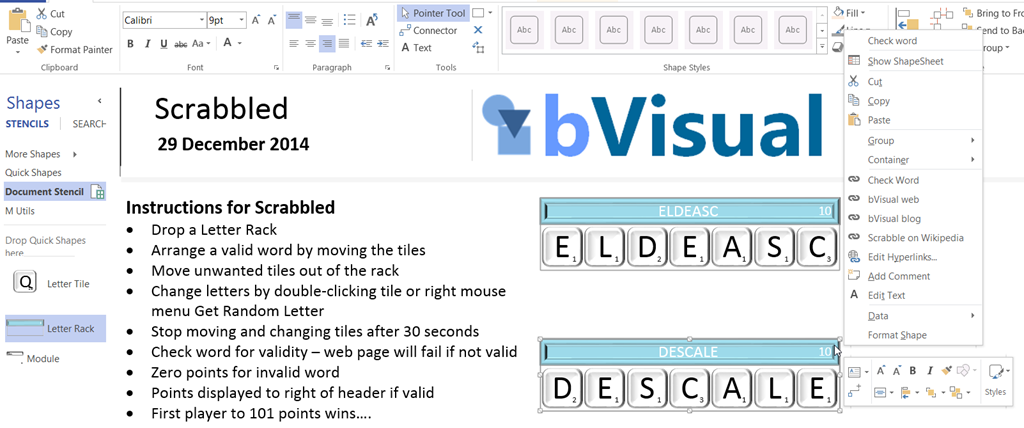
Last day of 2014, and the last of my word and number games in Visio … this is Scrabbled, which is a trainer for Scrabble. Okay, it was too difficult to do a fully working Scrabble board without code, and I was likely to break copyright if I did, so I invented a game with the Scrabble tile rack.

I have some suggested rules, but you can make your own up … I just wanted to see what I could do with just ShapeSheet functions..
image
[Read more…] about Get Scrabbled with Visio

Filed Under: Games, Lists, ShapeSheet Formulas, Visio 2013 Tagged With: Shape Data, ShapeSheet Functions

  • « Go to Previous Page
  • Page 1
  • Interim pages omitted …
  • Page 4
  • Page 5
  • Page 6
  • Page 7
  • Page 8
  • Page 9
  • Go to Next Page »

Primary Sidebar

  • LinkedIn
  • Twitter

Recent Posts

  • Protecting the integrity of custom Visio masters
  • Docked Stencils in Visio for the Web
  • My Visio Books and Old pre-C# Work
  • Migrating from Lucidchart to Visio?
  • Creating Boolean Context Menus in Visio

Categories

Tags

Accessibility Add-Ins AdvancedInstaller Connectors Containers Data Export Data Graphics Data Import Data Visualizer Educational Excel GraphDatabase Hyperlinks Icon Sets JavaScript LayerManager Layers Legend Link Data to Shapes MSIgnite Office365 Org Chart PowerApps PowerBI PowerQuery Processes Setup and Deployment Shape Data Shape Design ShapeSheet ShapeSheet Functions SharePoint 2013 SQL Teams Validation VBA Video Visio Visio 2007 Visio for the desktop Visio for the Web Visio Online Visio Services Visio Viewer Webinar

Footer

bVisual Profile

The UK-based independent Visio consultancy with a worldwide reach. We have over 25 years experience of providing data visualization solutions to companies around the globe.

Learn more about bVisual

  • Amazon
  • E-mail
  • Facebook
  • LinkedIn
  • Twitter
  • YouTube

Search this website

Recent posts

  • Protecting the integrity of custom Visio masters
  • Docked Stencils in Visio for the Web
  • My Visio Books and Old pre-C# Work
  • Migrating from Lucidchart to Visio?
  • Creating Boolean Context Menus in Visio

Copyright © 2026 · Executive Pro on Genesis Framework · WordPress · Log in