• Skip to main content
  • Skip to primary sidebar
  • Skip to footer

bVisual

  • Home
  • Services
    • How Visio smartness can help your business
    • Visio visual in Power BI
    • Visio Consulting Services
    • Visio Bureau Services
    • Visio Training and Support Services
  • Products
    • Visio Shape Report Converter
    • SS Plus
    • LayerManager
    • visViewer
    • Metro Icons
    • Rules Tools for Visio
    • The Visio 2010 Sessions App
    • Multi-Language Text for Visio
    • Document Imager for Visio
    • multiSelect for Visio
    • pdSelect for Visio
  • Case Studies
    • Case studies overview
    • Using Visio in Education for GIS
    • Visualizing Construction Project Schedules
    • Visio Online Business Process Mapping
    • Nexans Visio Template
    • CNEE Projects, WorldCom
    • Chase Manhattan Bank
  • News
    • Recent news
    • News archive
  • Resources
    • Articles➡
      • ShapeSheet Functions A-Z
      • Comparing Visio for the Web and Desktop
      • Customising Visio Shapes for the Web App
      • Key differences between the Visio desktop and web apps
      • Using the Visio Data Visualizer in Excel
      • Using Visio in Teams
      • Creating Visio Tabs and Apps for Teams with SharePoint Framework (SPFx)
      • Designing Power Automate Flows with Microsoft Visio
      • Innovative uses of Visio Lists
    • Webcasts ➡
      • Visio in Organizations
      • My session and other Visio sessions at MSIgnite 2019
      • Power up your Visio diagrams
      • Vision up your Visio diagrams
      • The Visio 2010 MVP Sessions
    • Visio Web Learning Resources
    • Books➡
      • Visualize Complex Processes with Microsoft Visio
      • Mastering Data Visualization with Microsoft Visio
      • Microsoft Visio Business Process Diagramming and Validation
      • Visualizing Information with Microsoft Visio
  • Blog
    • Browse blog articles
    • Visio Power BI articles
    • Visio for Web articles
    • A history of messaging and encryption
  • About us
    • About bVisual
    • Testimonials
    • Bio of David Parker
    • Contact Us
    • Website Privacy Policy
    • Website terms and conditions
    • Ariba Network

Visio

Published on April 3, 2020 by David Parker

Viewing Visio Files in Public Websites

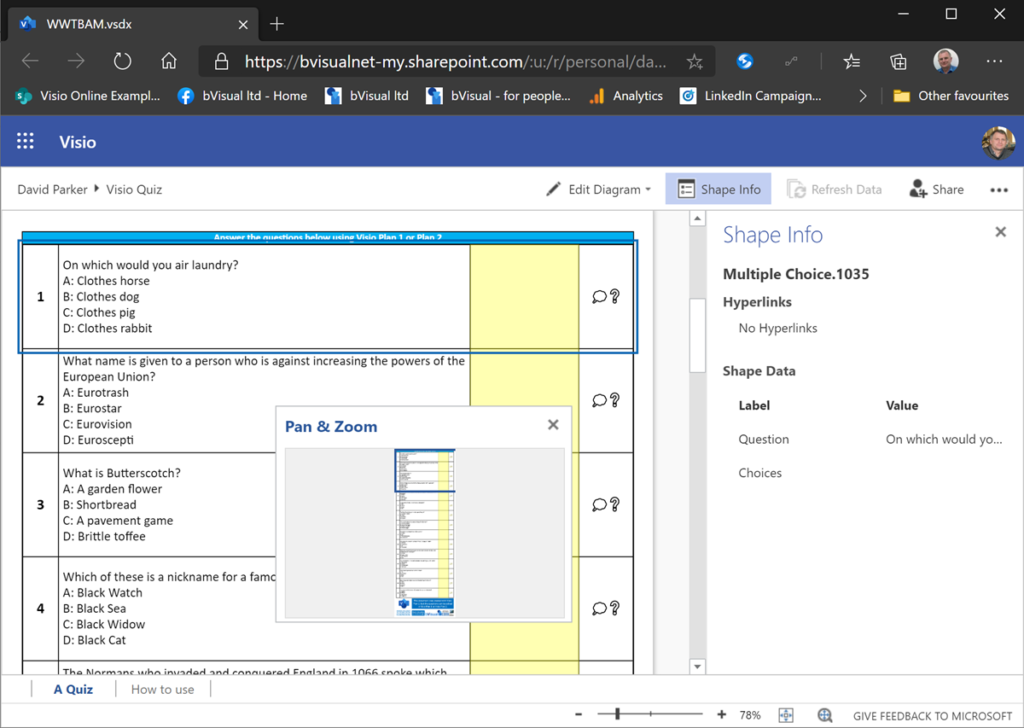
Some of my colleagues have asked me how I have managed to include Visio files into this public website, so I thought I would share my secret. Microsoft has kindly provided a File Viewer Web Part for use in SharePoint that appears to be useful in other websites too.

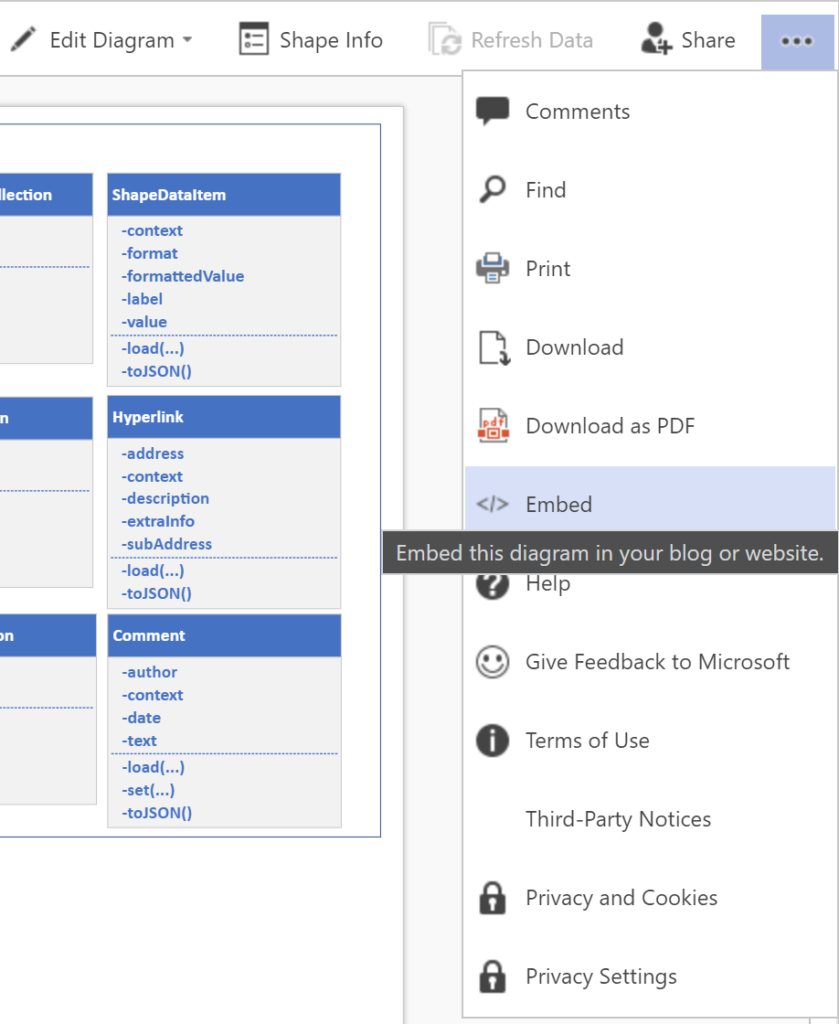
If you view a Visio file that is stored on OneDrive or in SharePoint Online, you can get the </> Embed code for the Visio document from the Show More Commands (…) button in the top right corner. This is normally intended for use within SharePoint pages.
[Read more…] about Viewing Visio Files in Public Websites

Filed Under: JavaScript, Uncategorized, Visio, Visio for Web, Visio Online Tagged With: Visio, Visio for the Web, Visio Online

Published on March 31, 2020 by David Parker

Using CODE() and UNICODE() functions in Visio

Microsoft Visio does have CHAR() and UNICHAR() ShapeSheet functions, just like Excel, but it does not have the inverse CODE() and UNICODE() functions, unlike Excel. However, there is a way to create a formula in the Visio ShapeSheet to provide these functions.

The following worksheet demonstrates how the CHAR(), CODE(), UNICHAR(), and UNICODE() functions work in Excel.

ColumnFormula
Indexn
Char=IFERROR( CHAR(INT([@Index])),””)
Code=IFERROR( CODE([@Char]),””)
Unichar=UNICHAR(INT([@Index]))
Unicode=UNICODE([@Unichar])
[Read more…] about Using CODE() and UNICODE() functions in Visio

Filed Under: Excel, Lists, Shape Data, ShapeSheet Formulas, Visio Tagged With: Excel, ShapeSheet Functions, Visio

Published on March 25, 2020 by David Parker

Preventing Deletion of Container Members in Visio

The concept of Structured Diagrams was introduced in Visio 2010 and is featured in many of the templates supplied with Microsoft Visio, and in some third-party solutions, like mine. Connectors, callouts, containers and lists are the key parts of a structured diagrams, and there are times when preventing the deletion of members of a container or list is desirable.

  • An example cross-functional flowchart
  • Accidental deletion of a process shape
[Read more…] about Preventing Deletion of Container Members in Visio

Filed Under: Containers, Lists, Process Flows, ShapeSheet Formulas, Visio Tagged With: Containers, Lists, ShapeSheet Functions, Visio

Published on February 18, 2020 by David Parker

Webinar on Visio, SharePoint and Teams using SPFx

I will be presenting a webinar on embedding Visio diagram in SharePoint Online and Teams next month, please register here ! (Or if you missed it live, then watch the recording !)

The slides are available at https://www.slideshare.net/bvisual/creating-a-visio-web-part-with-sharepoint-spfx

Related Posts

Viewing Visio Files in Public Websites

Some of my colleagues have asked me how I have managed to include Visio files into this public website, so I thought I would share my secret. Microsoft has kindly provided a File Viewer Web Part for use in SharePoint that appears to be useful in other websites too. If you view a Visio file…

Testing for mouse events

Triggering Shape Mouse Enter and Leave JavaScript events in Visio Online

learn why shape mouse enter and leave events may not fire in Visio for the web, and how to fix it.

Extensibility Roadmap

Support for the Visio JavaScript API in SharePoint Modern Framework, and more

Visio Extensibility roadmap from Microsoft Ignite 2018

Visio JavaScript API preview announced

Microsoft have just announced the availability of the new Visio JavaScript Api ( see Visio JavaScript APIs Preview). I presented this last week at the Artic SharePoint Challenge in Oslo where a number of developers took the opportunity to create data-linked Visio diagrams in Visio, and interact with them in SharePoint. Here is an abbreviated…

Using JavaScript to Find and Highlight Visio Shapes by Shape Data values in SharePoint Content Editor

In August, I wrote about Using JavaScript to Display Visio Shape Data and Hyperlinks in SharePoint Content Editor ( see http://blog.bvisual.net/2014/08/16/using-javascript-to-display-visio-shape-data-and-hyperlinks-in-sharepoint-content-editor/ ), so now I have added the ability to select shapes by a property value. The main advantage of using JavaScript in the client is that there is no need to go back to…

Using JavaScript to Display Visio Shape Data and Hyperlinks in SharePoint Content Editor

I like embedding Visio diagrams into SharePoint web pages, but I am not too enamoured with the Shape Info panel and the popup hyperlinks menu because they clutter the diagram surface. So, I thought I would take some time to make an html document that can be included in a Content Editor web part. This…

Filed Under: JavaScript, SharePoint, Teams, TypeScript, Visio Tagged With: JavaScript, React, Teams, Visio Online

Published on February 6, 2020 by David Parker

LinkedIn now has Visio Skills Assessment

Did you know that you can boast about your Visio skills on LinkedIn now? I just took the assessment, and fortunately, I passed … otherwise I wouldn’t be telling the world abut it 🙂

The entry point is cunningly hidden towards the bottom of your profile!

Filed Under: Visio Tagged With: LinkedIn, Visio

Published on February 3, 2020 by David Parker

Embedding Visio documents for public viewing

I have been asked by a colleague to publish my hack for enabling Visio files to be viewed by everyone with the Visio for the Web component in reading mode on this website, or indeed any other public web site. So, here goes ….

The first thing is to view the Visio file in an online browser. The file must be stored in OneDrive (or SharePoint Online if permission for guests available). The View online option is available from the right mouse menu of a selected Visio file, if viewing in Windows Explorer, or simply open the file, if listed in the browser. Note the “…” (More Commands) button in the top right corner.

[Read more…] about Embedding Visio documents for public viewing

Filed Under: SharePoint Online, Teams, Visio for Web, Visio Online Tagged With: Visio Online

  • « Go to Previous Page
  • Page 1
  • Interim pages omitted …
  • Page 15
  • Page 16
  • Page 17
  • Page 18
  • Page 19
  • Interim pages omitted …
  • Page 70
  • Go to Next Page »

Primary Sidebar

  • LinkedIn
  • Twitter

Recent Posts

  • Creating Boolean Context Menus in Visio
  • Installing Visio Templates and Stencils
  • Creating a Dynamic connector master automatically
  • A visual exploration of Penrose Tiling in Visio
  • How SVG in Visio can cause a Shape.BoundingBox(…) error

Categories

Tags

Accessibility Add-Ins AdvancedInstaller Connectors Containers Data Export Data Graphics Data Import Data Visualizer Educational Excel GraphDatabase Hyperlinks Icon Sets JavaScript LayerManager Layers Legend Link Data to Shapes MSIgnite Office365 Org Chart PowerApps PowerBI PowerQuery Processes Setup and Deployment Shape Data Shape Design ShapeSheet ShapeSheet Functions SharePoint 2013 SQL Teams Validation VBA Video Visio Visio 2007 Visio for the desktop Visio for the Web Visio Online Visio Services Visio Viewer Webinar

Footer

bVisual Profile

The UK-based independent Visio consultancy with a worldwide reach. We have over 25 years experience of providing data visualization solutions to companies around the globe.

Learn more about bVisual

  • Amazon
  • E-mail
  • Facebook
  • LinkedIn
  • Twitter
  • YouTube

Search this website

Recent posts

  • Creating Boolean Context Menus in Visio
  • Installing Visio Templates and Stencils
  • Creating a Dynamic connector master automatically
  • A visual exploration of Penrose Tiling in Visio
  • How SVG in Visio can cause a Shape.BoundingBox(…) error

Copyright © 2026 · Executive Pro on Genesis Framework · WordPress · Log in