• Skip to main content
  • Skip to primary sidebar
  • Skip to footer

bVisual

  • Home
  • Services
    • How Visio smartness can help your business
    • Visio visual in Power BI
    • Visio Consulting Services
    • Visio Bureau Services
    • Visio Training and Support Services
  • Products
    • Visio Shape Report Converter
    • SS Plus
    • LayerManager
    • visViewer
    • Metro Icons
    • Rules Tools for Visio
    • The Visio 2010 Sessions App
    • Multi-Language Text for Visio
    • Document Imager for Visio
    • multiSelect for Visio
    • pdSelect for Visio
  • Case Studies
    • Case studies overview
    • Using Visio in Education for GIS
    • Visualizing Construction Project Schedules
    • Visio Online Business Process Mapping
    • Nexans Visio Template
    • CNEE Projects, WorldCom
    • Chase Manhattan Bank
  • News
    • Recent news
    • News archive
  • Resources
    • Articles➡
      • ShapeSheet Functions A-Z
      • Comparing Visio for the Web and Desktop
      • Customising Visio Shapes for the Web App
      • Key differences between the Visio desktop and web apps
      • Using the Visio Data Visualizer in Excel
      • Using Visio in Teams
      • Creating Visio Tabs and Apps for Teams with SharePoint Framework (SPFx)
      • Designing Power Automate Flows with Microsoft Visio
      • Innovative uses of Visio Lists
    • Webcasts ➡
      • Visio in Organizations
      • My session and other Visio sessions at MSIgnite 2019
      • Power up your Visio diagrams
      • Vision up your Visio diagrams
      • The Visio 2010 MVP Sessions
    • Visio Web Learning Resources
    • Books➡
      • Visualize Complex Processes with Microsoft Visio
      • Mastering Data Visualization with Microsoft Visio
      • Microsoft Visio Business Process Diagramming and Validation
      • Visualizing Information with Microsoft Visio
  • Blog
    • Browse blog articles
    • Visio Power BI articles
    • Visio for Web articles
    • A history of messaging and encryption
  • About us
    • About bVisual
    • Testimonials
    • Bio of David Parker
    • Contact Us
    • Website Privacy Policy
    • Website terms and conditions
    • Ariba Network

Images

Published on May 25, 2026 by David Parker

Migrating from Lucidchart to Visio?

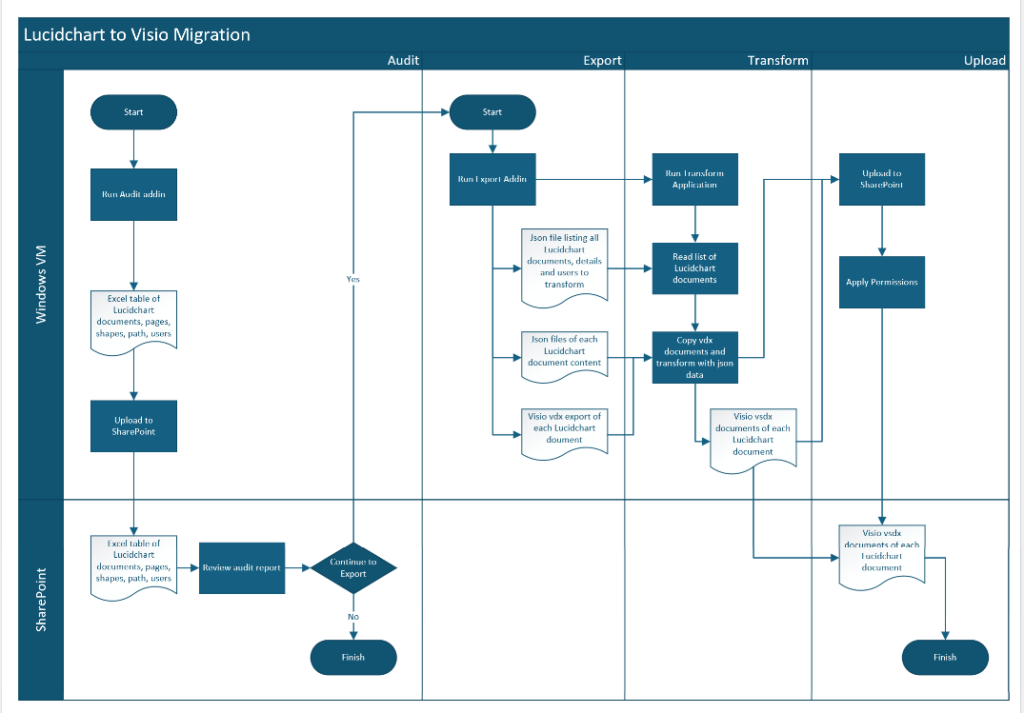
My fellow Visio MVP, Michel Laplane, and I recently converted and transformed 15k Lucidchart documents to Microsoft Visio for a large multi-national organization. This was approximately 4 years after they had moved from Visio to Lucidchart! I do not know the full reason behind these changes in technology, and I do not have a particular dislike of Lucidchart, but my passion is Visio, so I was willing to assist SohoDragon in this migration for their client. The Lucidchart application is solely a web-based diagramming system with the documents stored in AWS, so perhaps it does not fit easily within the corporate compliance architecture of Microsoft Azure, Teams and SharePoint. Microsoft Visio though has the same files for both the desktop and web editions, although there are some restrictions in the size and features of editing Visio document in the web. However, all the M365 users will have the ability to view and comment of the Visio documents that they have permission for. Visio Plan 1 or Plan 2 subscriptions will be required for editing the migrated documents because they have not been created with the templates provided in Visio for M365, and Visio documents which have any page with over a thousand shapes will currently only be editable in the Visio desktop edition. The Lucidchart documents needed to be audited, exported and transformed into Visio documents, and then uploaded to similar folders in SharePoint, where user permissions could be applied. We decided to use multiple secure Windows VMs to process the documents and then upload them to SharePoint before the VMs were deleted.
[Read more…] about Migrating from Lucidchart to Visio?

Filed Under: C#, Connections, Connectors, Containers, Images, JSON, MVP, Products, Shape Data Tagged With: Lucidchart, Migration, Visio

Published on January 10, 2019 by David Parker

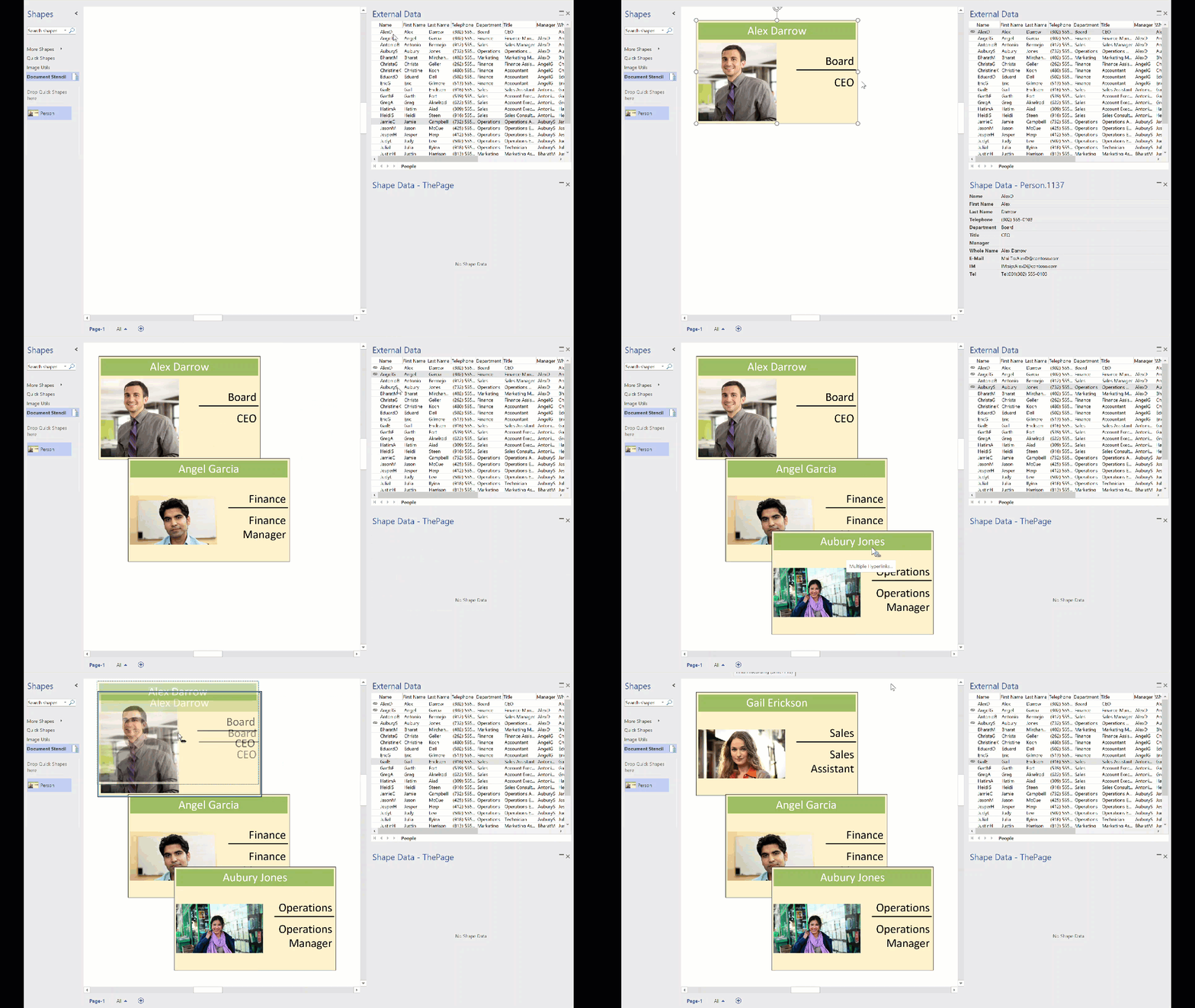
Replacing Images in Visio Shapes by Changing Data

I wrote an article last year about Swapping Images in a #Visio Shape manually, but I want to be able to do this whenever a Shape Data value changes. This is because I use I invariably use shapes linked to data. I also want to be able to have multiple images within a single grouped shape, and all of them changing when their referenced Shape Data values change. I believe that this will be more adaptable for a lot of scenarios than trying to repurpose Data Graphic Icon Sets ( see  Make Your Own Visio Data Graphic Icons Sets … automatically). I also discovered that the Shape.ChangePicture(…) function can just as easily work with urls as it can with network file paths, so even more possibilities are opened up! For example, the Visio Online JavaScript API has the ability to overlay an image (see ShapeView.addOverlay(…)).
So, I have created some macros to provide quick and easy selection, positioning and updating of images within a group shape.

personphotosbydata


I decided to present this article with VBA code rather than my preferred C# so that a stencil could be downloaded to provide instant usability, rather than having to install an add-in. It can be download from Image Utils.vssm, and should then be placed in to My Shapes folder, so that it becomes available to open in Visio. When it is opened, then the macros will need to be enabled.
There are just five public macros:

[Read more…] about Replacing Images in Visio Shapes by Changing Data

Filed Under: Excel, External Data, Geographic, Images, Org Charts, Shape Data, VBA, Visio Tagged With: Link Data to Shapes, Macros, ShapeSheet, VBA

Published on April 17, 2018 by David Parker

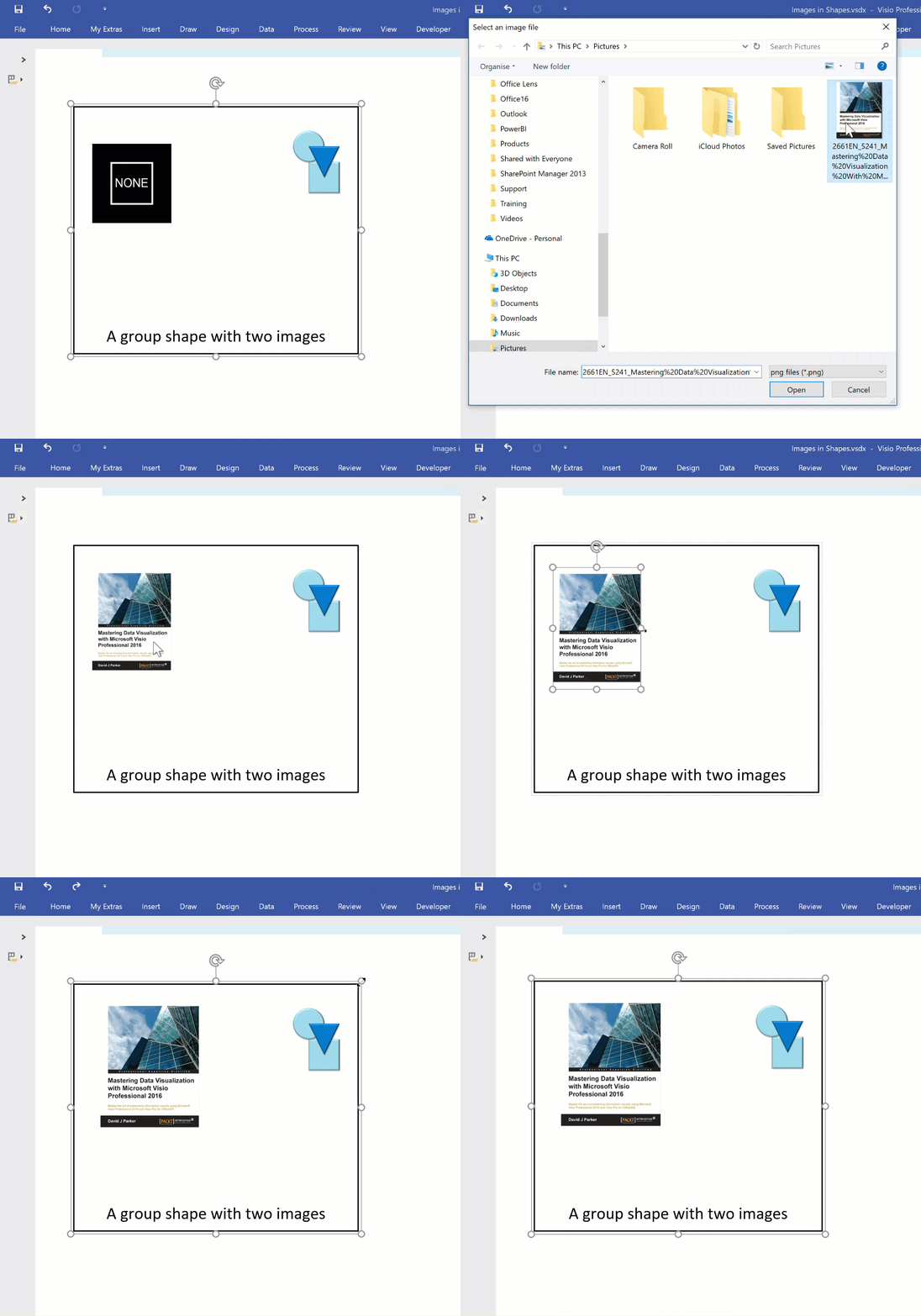
Swapping Images in a Visio Shape

I often include images in Visio diagrams, and sometimes they are part of a group shape. There are times when I need to swap the image for another, and I want the correct width to height ratio for the new image to be applied, otherwise the image will be distorted. I recently realised that the Shape.ChangePicture() function in Visio actually returns this ratio which can then be applied to the shape cells so that the image is not distorted. Therefore I wrote some C# code (in LinqPad) to utilize this method to provide the option to change the image in a selected shape or sub-shape.

So, I wrote this function in C# to swap the image of the shape, and to apply the formulas to maintain its correct aspect ratio, even if the shape is subsequently resized.

ChangePicture
[Read more…] about Swapping Images in a Visio Shape

Filed Under: C#, Images, ShapeSheet Formulas, Visio, Visio 2016 Tagged With: Automation, ShapeSheet

Published on November 22, 2017 by David Parker

Scroll to Capture Visio ShapeSheets with SnagIt

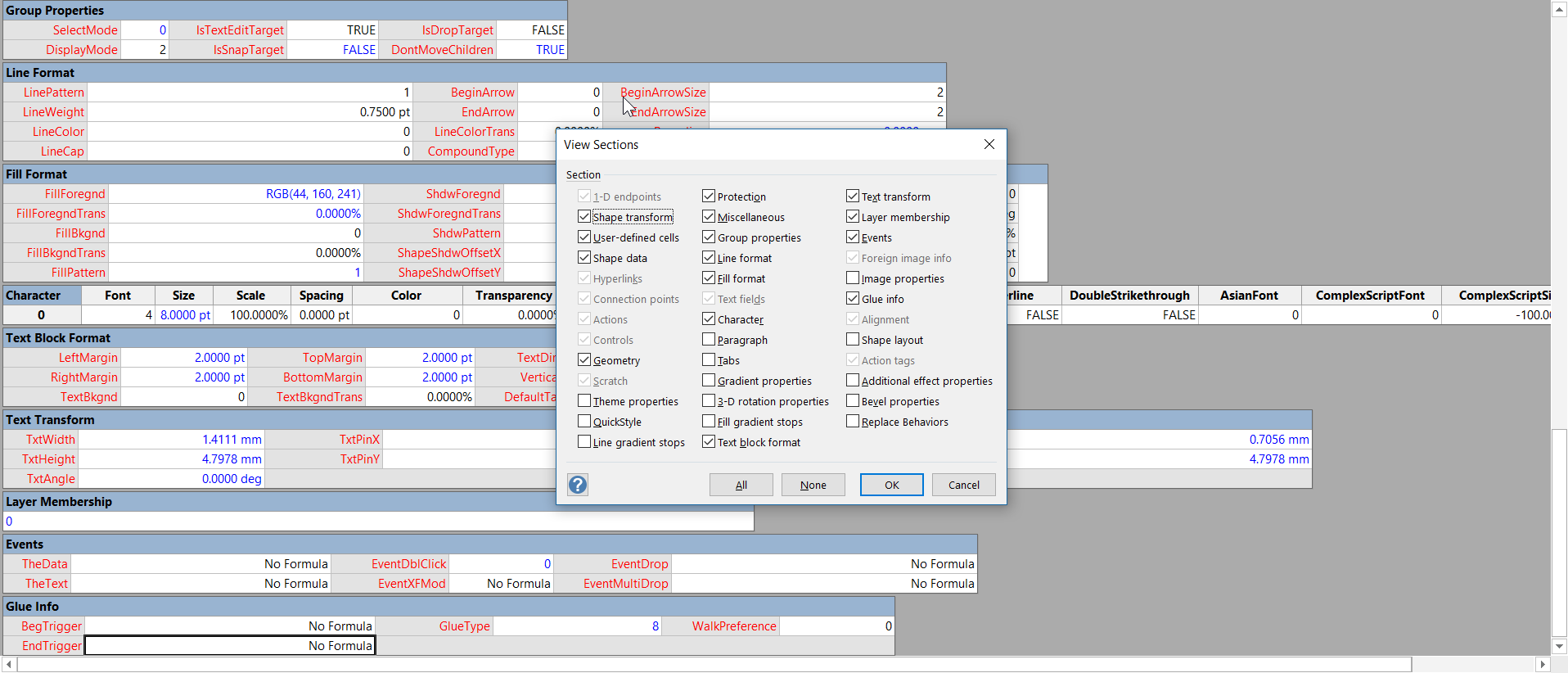
Anyone who develops with Visio faces the problem of viewing the formulas and values in an often difficult to navigate ShapeSheet window. I have been a SnagIt and Camtasia user for many years thanks to the generous free license I get from TechSmith as a Microsoft MVP. I have used both products extensively for my books, articles and videos, though I am not an expert in either product. Now, SnagIt has a panoramic scrolling capture feature that is great with ShapeSheets.
The unique smartness of Visio shapes comes from the ability to program the ShapeSheet behind every single shape. This is like an Excel worksheet divided into sections, and the display can switched between formulas and values. The Visio’s ShapeSheet window does have the ability to toggle the visibility of each section, but that is often not enough to get a complete picture of the formulas involved. The following example is the partial view of the ShapeSheet window for a simple shape.

ViewSections
[Read more…] about Scroll to Capture Visio ShapeSheets with SnagIt

Filed Under: Images, ShapeSheet Formulas, Visio, Visio 2016 Tagged With: ShapeSheet, SnagIt

Primary Sidebar

  • LinkedIn
  • Twitter

Recent Posts

  • My Visio Books and Old pre-C# Work
  • Migrating from Lucidchart to Visio?
  • Creating Boolean Context Menus in Visio
  • Installing Visio Templates and Stencils
  • Creating a Dynamic connector master automatically

Categories

Tags

Accessibility Add-Ins AdvancedInstaller Connectors Containers Data Export Data Graphics Data Import Data Visualizer Educational Excel GraphDatabase Hyperlinks Icon Sets JavaScript LayerManager Layers Legend Link Data to Shapes MSIgnite Office365 Org Chart PowerApps PowerBI PowerQuery Processes Setup and Deployment Shape Data Shape Design ShapeSheet ShapeSheet Functions SharePoint 2013 SQL Teams Validation VBA Video Visio Visio 2007 Visio for the desktop Visio for the Web Visio Online Visio Services Visio Viewer Webinar

Footer

bVisual Profile

The UK-based independent Visio consultancy with a worldwide reach. We have over 25 years experience of providing data visualization solutions to companies around the globe.

Learn more about bVisual

  • Amazon
  • E-mail
  • Facebook
  • LinkedIn
  • Twitter
  • YouTube

Search this website

Recent posts

  • My Visio Books and Old pre-C# Work
  • Migrating from Lucidchart to Visio?
  • Creating Boolean Context Menus in Visio
  • Installing Visio Templates and Stencils
  • Creating a Dynamic connector master automatically

Copyright © 2026 · Executive Pro on Genesis Framework · WordPress · Log in