• Skip to main content
  • Skip to primary sidebar
  • Skip to footer

bVisual

  • Home
  • Services
    • How Visio smartness can help your business
    • Visio visual in Power BI
    • Visio Consulting Services
    • Visio Bureau Services
    • Visio Training and Support Services
  • Products
    • Visio Shape Report Converter
    • SS Plus
    • LayerManager
    • visViewer
    • Metro Icons
    • Rules Tools for Visio
    • The Visio 2010 Sessions App
    • Multi-Language Text for Visio
    • Document Imager for Visio
    • multiSelect for Visio
    • pdSelect for Visio
  • Case Studies
    • Case studies overview
    • Using Visio in Education for GIS
    • Visualizing Construction Project Schedules
    • Visio Online Business Process Mapping
    • Nexans Visio Template
    • CNEE Projects, WorldCom
    • Chase Manhattan Bank
  • News
    • Recent news
    • News archive
  • Resources
    • Articles➡
      • ShapeSheet Functions A-Z
      • Comparing Visio for the Web and Desktop
      • Customising Visio Shapes for the Web App
      • Key differences between the Visio desktop and web apps
      • Using the Visio Data Visualizer in Excel
      • Using Visio in Teams
      • Creating Visio Tabs and Apps for Teams with SharePoint Framework (SPFx)
      • Designing Power Automate Flows with Microsoft Visio
      • Innovative uses of Visio Lists
    • Webcasts ➡
      • Visio in Organizations
      • My session and other Visio sessions at MSIgnite 2019
      • Power up your Visio diagrams
      • Vision up your Visio diagrams
      • The Visio 2010 MVP Sessions
    • Visio Web Learning Resources
    • Books➡
      • Visualize Complex Processes with Microsoft Visio
      • Mastering Data Visualization with Microsoft Visio
      • Microsoft Visio Business Process Diagramming and Validation
      • Visualizing Information with Microsoft Visio
  • Blog
    • Browse blog articles
    • Visio Power BI articles
    • Visio for Web articles
    • A history of messaging and encryption
  • About us
    • About bVisual
    • Testimonials
    • Bio of David Parker
    • Contact Us
    • Website Privacy Policy
    • Website terms and conditions
    • Ariba Network

Visio

Published on September 26, 2014 by David Parker

Linking SQL database on Azure to Visio via SharePoint Online

My last post was entitled Linking SQL database on Azure to Visio (see http://blog.bvisual.net/2014/09/11/linking-sql-database-on-azure-to-visio/), but that was only half the solution I wanted to present because I was having issues with linking my SQL database on Azure to my SharePoint Online. So, I enlisted my friend and colleague, Nick Ajderian, who looked into it and wrote the following blog article : http://softwaremechanik.wordpress.com/2014/09/24/connecting-microsoft-azure-to-sharepoint/ . Well, I still failed, until I realised a subtle error that I was making …

In my previous article, I showed how to connect directly to the SQL database on Azure by using the Data Connection Wizard, where I entered the Server name with the “, 1433” suffix in order to address the port. Well, when I kept on entering the same server name in the SQL Server Connection dialog for the new connection in the Data Source Explorer for a External Content Type in SharePoint Designer, everything was looking fine because I could expand the connection to view the tables and create the operations. I could even create the External List okay, but I could not view any records in it, and kept getting a connection error. I was getting very frustrated until I dropped the “, 1433”, then everything worked!

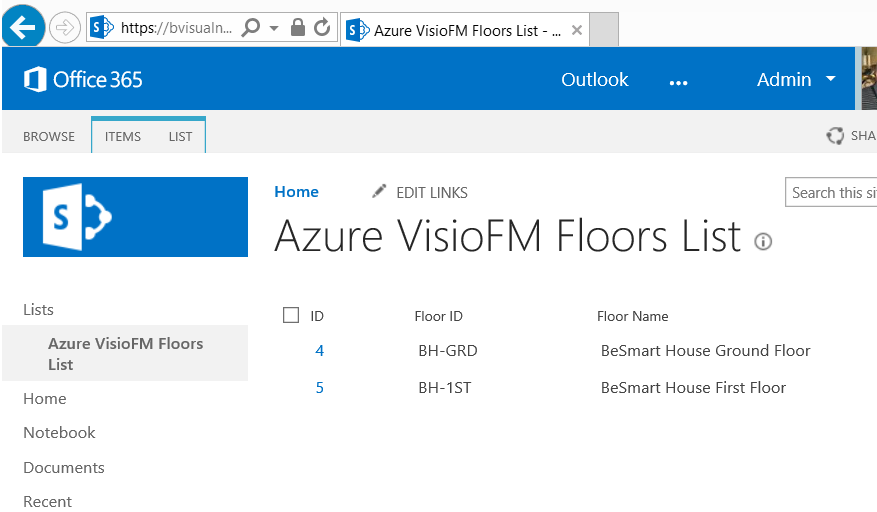
Here is my Floors table from my SQL database on Azure in SharePoint Online:
SNAGHTML47319fc

So, now I can select this list, as a Microsoft SharePoint Foundation List, using Link Data to Shapes in Visio:

[Read more…] about Linking SQL database on Azure to Visio via SharePoint Online
Filed Under: Azure, Visio 2013 Tagged With: SharePoint 2013, Visio Services

Published on September 11, 2014 by David Parker

Linking SQL database on Azure to Visio

Microsoft Visio has many data sources available for Link Data to Shapes, and one of those is SQL Server. Microsoft Azure is increasingly becoming a low-cost, and always available, choice for hosting all sorts of data, and applications, so I thought I would document how easy it is to setup a SQL database on Azure for use with Visio.

Creating the SQL database on Azure

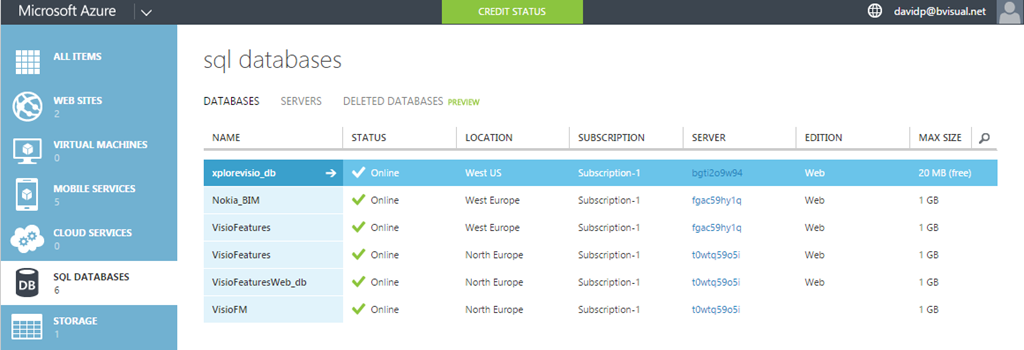
First, you need register for an Azure subscription, and then create a SQL database on a server in a suitable location.

Create Azure Sql database

[Read more…] about Linking SQL database on Azure to Visio

Filed Under: Azure, External Data, Shape Data, SQL Server, Visio 2013 Tagged With: SQL, Visio

Published on September 10, 2014 by David Parker

Union Jacked?

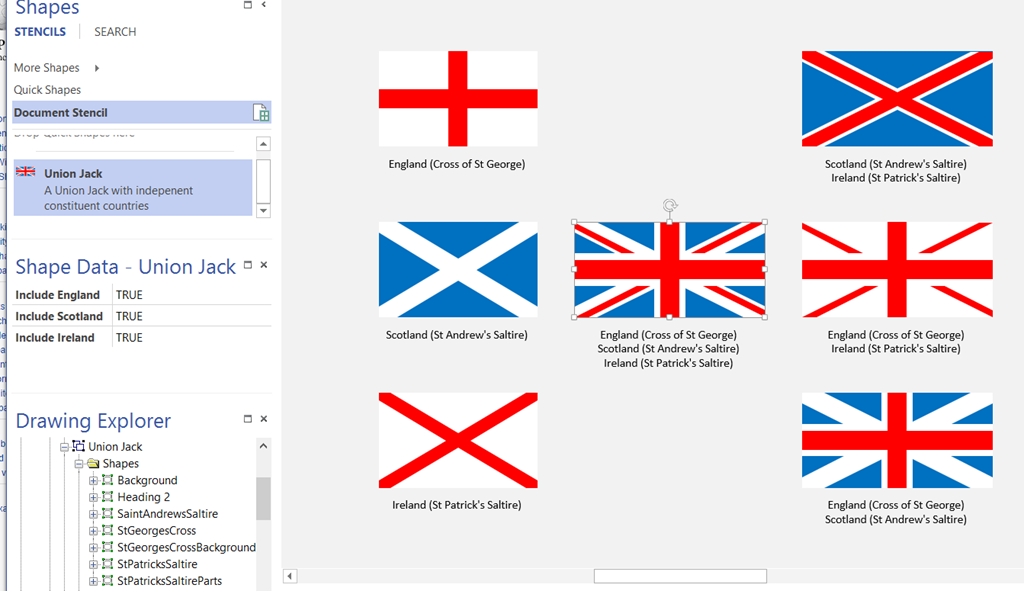
I am in Edinburgh, capital of Scotland, today. All talk is of the vote on Scottish independence next week … so, I thought I would make a Union Jack Visio shape that can be automatically changed, using Shape Data values, to represent the countries left in the union!

The Union Jack is comprised of the flags of England, Scotland and Ireland … sorry Wales, you are only a principality. Yes, I know that Northern Ireland is a province, but it was decided that St Patrick’s Saltire should be kept even after Eire got independence.

Note that a single country flag has an aspect ratio of 5:3, but a multi-country union flag has an aspect ratio of 2:1.

image
[Read more…] about Union Jacked?

Filed Under: Geographic, Shape Data, ShapeSheet Formulas, Visio Tagged With: Shape Data, ShapeSheet Functions

Published on August 26, 2014 by David Parker

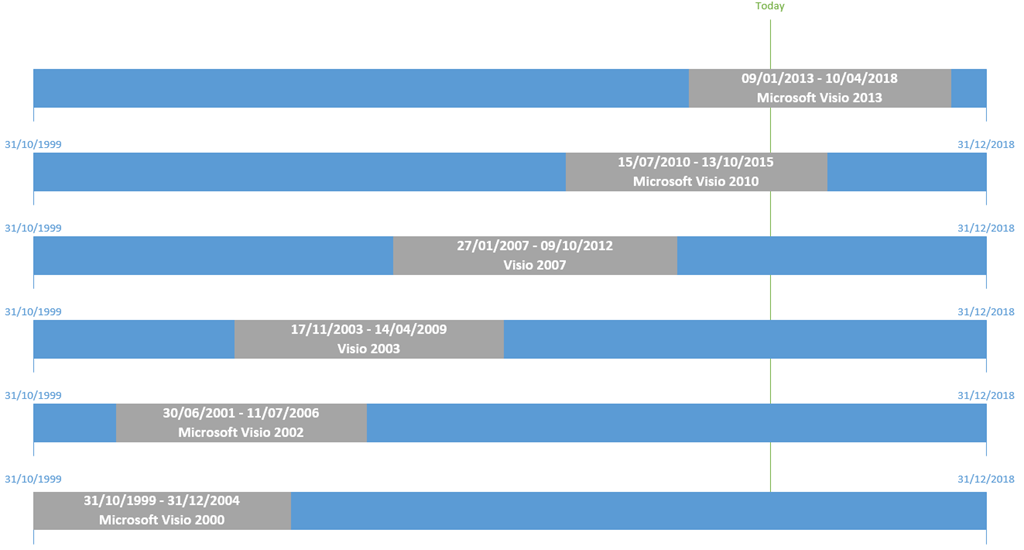
Microsoft Visio Product Lifecycle Chart

My colleague and fellow Visio MVP, John Goldsmith, recently made me aware of this useful Microsoft web page where one can lookup the Lifecycle Start Date;Mainstream Support End Date;Extended Support End Date; andService Pack Support End Date for all Microsoft products, but I have set the filter for Visio :

http://support.microsoft.com/lifecycle/search/default.aspx?sort=PN&alpha=Microsoft+Visio+&Filter=FilterNO

He hasn’t posted this link yet, so I thought I would… and here is a visual summary for Microsoft Visio :

image

Filed Under: Visio

Published on August 21, 2014 by David Parker

Using Icon Sets shapes to display Shape Data values

A reader of my blog recently asked whether it is possible to use the icons in out-of-the-box Visio as the main shape, and get it to refresh with data. I pointed out that all of the icon sets are available in a handy stencil under Visio Extras, so all that remains is to make the icon display change according to data values.

SNAGHTML2b09d2
[Read more…] about Using Icon Sets shapes to display Shape Data values

Filed Under: Data Graphics, Shape Data, ShapeSheet Formulas, Visio, Visio 2013 Tagged With: Shape Data

Published on August 16, 2014 by David Parker

Using JavaScript to Display Visio Shape Data and Hyperlinks in SharePoint Content Editor

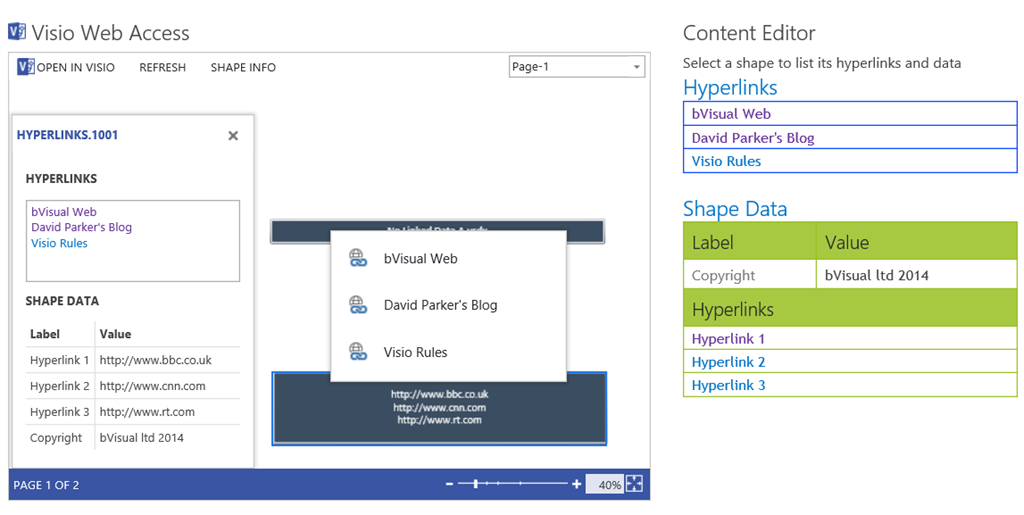
I like embedding Visio diagrams into SharePoint web pages, but I am not too enamoured with the Shape Info panel and the popup hyperlinks menu because they clutter the diagram surface. So, I thought I would take some time to make an html document that can be included in a Content Editor web part. This html document includes JavaScript to read the hyperlinks and Shape Data of each selected shape, and, besides providing the opportunity to style the resultant table, allows you to interpret the content of the Shape Data values, and even the hyperlinks. I have shown an example where the multiple hyperlinks on the selected shape are clickable in the top list, and those interpreted from the values in Shape Data rows are clickable, and listed below the regular Shape Data rows. Of course, I could have combined the two types of hyperlinks into one list, separated from the regular Shape Data. Note that the values in the built-in Shape Info panel are not clickable. 

image

So, this means that I can do away with the Shape Info panel and the hyperlinks popup within the Visio Web Access control, and provide hyperlinks, buttons, images, media files, or whatever, in the Content Editor html document. Therefore, I untick the Show the Shape Information Pane option, and tick the Disable Hyperlink option in the web part editor.

[Read more…] about Using JavaScript to Display Visio Shape Data and Hyperlinks in SharePoint Content Editor

Filed Under: JavaScript, SharePoint, SharePoint 2013, Visio 2013, Visio Services Tagged With: Visio Services

  • « Go to Previous Page
  • Page 1
  • Interim pages omitted …
  • Page 44
  • Page 45
  • Page 46
  • Page 47
  • Page 48
  • Interim pages omitted …
  • Page 71
  • Go to Next Page »

Primary Sidebar

  • LinkedIn
  • Twitter

Recent Posts

  • Introducing a free Visio Report Runner application
  • Protecting the integrity of custom Visio masters
  • Docked Stencils in Visio for the Web
  • My Visio Books and Old pre-C# Work
  • Migrating from Lucidchart to Visio?

Categories

Tags

Accessibility Add-Ins AdvancedInstaller Connectors Containers Data Export Data Graphics Data Import Data Visualizer Educational Excel GraphDatabase Hyperlinks Icon Sets JavaScript LayerManager Layers Legend Link Data to Shapes MSIgnite Office365 Org Chart PowerApps PowerBI PowerQuery Processes Setup and Deployment Shape Data Shape Design ShapeSheet ShapeSheet Functions SharePoint 2013 SQL Teams Validation VBA Video Visio Visio 2007 Visio for the desktop Visio for the Web Visio Online Visio Services Visio Viewer Webinar

Footer

bVisual Profile

The UK-based independent Visio consultancy with a worldwide reach. We have over 25 years experience of providing data visualization solutions to companies around the globe.

Learn more about bVisual

  • Amazon
  • E-mail
  • Facebook
  • LinkedIn
  • Twitter
  • YouTube

Search this website

Recent posts

  • Introducing a free Visio Report Runner application
  • Protecting the integrity of custom Visio masters
  • Docked Stencils in Visio for the Web
  • My Visio Books and Old pre-C# Work
  • Migrating from Lucidchart to Visio?

Copyright © 2026 · Executive Pro on Genesis Framework · WordPress · Log in