• Skip to main content
  • Skip to primary sidebar
  • Skip to footer

bVisual

  • Home
  • Services
    • How Visio smartness can help your business
    • Visio visual in Power BI
    • Visio Consulting Services
    • Visio Bureau Services
    • Visio Training and Support Services
  • Products
    • Visio Shape Report Converter
    • SS Plus
    • LayerManager
    • visViewer
    • Metro Icons
    • Rules Tools for Visio
    • The Visio 2010 Sessions App
    • Multi-Language Text for Visio
    • Document Imager for Visio
    • multiSelect for Visio
    • pdSelect for Visio
  • Case Studies
    • Case studies overview
    • Using Visio in Education for GIS
    • Visualizing Construction Project Schedules
    • Visio Online Business Process Mapping
    • Nexans Visio Template
    • CNEE Projects, WorldCom
    • Chase Manhattan Bank
  • News
    • Recent news
    • News archive
  • Resources
    • Articles➡
      • ShapeSheet Functions A-Z
      • Comparing Visio for the Web and Desktop
      • Customising Visio Shapes for the Web App
      • Key differences between the Visio desktop and web apps
      • Using the Visio Data Visualizer in Excel
      • Using Visio in Teams
      • Creating Visio Tabs and Apps for Teams with SharePoint Framework (SPFx)
      • Designing Power Automate Flows with Microsoft Visio
      • Innovative uses of Visio Lists
    • Webcasts ➡
      • Visio in Organizations
      • My session and other Visio sessions at MSIgnite 2019
      • Power up your Visio diagrams
      • Vision up your Visio diagrams
      • The Visio 2010 MVP Sessions
    • Visio Web Learning Resources
    • Books➡
      • Visualize Complex Processes with Microsoft Visio
      • Mastering Data Visualization with Microsoft Visio
      • Microsoft Visio Business Process Diagramming and Validation
      • Visualizing Information with Microsoft Visio
  • Blog
    • Browse blog articles
    • Visio Power BI articles
    • Visio for Web articles
    • A history of messaging and encryption
  • About us
    • About bVisual
    • Testimonials
    • Bio of David Parker
    • Contact Us
    • Website Privacy Policy
    • Website terms and conditions
    • Ariba Network

Visio

Published on April 8, 2014 by David Parker

Adding Configure Callout functionality to Visio Callouts

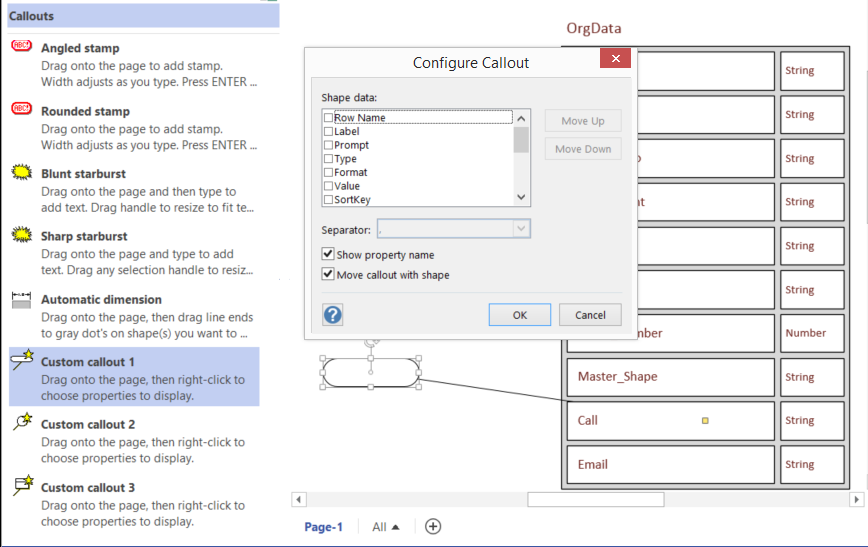
Visio is always improving but sometimes some functionality is hard to find, and gets forgotten about. For example, the Custom callout 1,2 and 3 masters on the Visio Extras \ Callouts stencil have been there for a few years, yet most users do not find them or realise what they can do. They provide the ability for a connected callout shape to display the values, and optional labels, of a target shape. This can be most useful for automatic annotations because they are always up to date. However, Visio recently introduced some new Callout shapes, but this ability is not there by default. In this blog, I show you how to add this useful feature to the new Callouts.

First, let’s look at the older Custom callout shapes, which automatically open a Configure Callout dialog when connected to another shape. This callout invites you to display selected Shape Data rows of the target shape:
image


[Read more…] about Adding Configure Callout functionality to Visio Callouts
Filed Under: Callouts, Visio 2013 Tagged With: Callouts

Published on April 2, 2014 by David Parker

10 years and counting …

I avoided posting this yesterday … just in case it was considered an April Fool’s Day prank … but I am pleased (and relieved) to get my 10 years award as a Microsoft MVP for Visio. This gives me renewed enthusiasm to continue blogging technical articles about Visio. Watch this space …..

Filed Under: Visio Tagged With: MVP

Published on March 26, 2014 by David Parker

Creating a Schema from Visio External Data record sets

Visio introduced External Data record sets in 2007, and I have made great use of them ever since. Visio 2013 has deprecated reverse engineering of databases to produce a schema, which was a function that I loved to use because it allowed me to provide clients with up to date, annotated, enhanced schema diagrams. Microsoft have, however, provided some nice database schema templates in Visio 2013 Professional, so I thought I would provide a way to use the External Data record sets to produce schema diagrams.

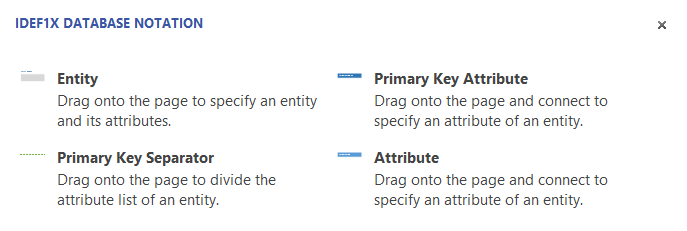
I have created a new custom stencil, based upon the IDEF1X Database Notation template in Visio 2013 Professional, and have added some macros to provide the guided diagramming. I say guided because page position of tables and relationships are left to you, but the macros will create table definitions from External Data record sets.

All of the three database notation templates contain an Entity and an Attribute master. In fact, they also have a Primary Key Attribute master too, but this is identical to the Attribute master, apart from a setting to say it is the primary key. This can be done from the Attribute shape anyway, so I will dispense with the Primary Key Attribute master.

image
[Read more…] about Creating a Schema from Visio External Data record sets

Filed Under: Database, External Data, Lists, Visio, Visio 2013 Tagged With: ER Diagrams

Published on March 3, 2014 by David Parker

Mapping SharePoint List Columns to Visio Shape Data Types

The shape data in Visio 2013 diagrams can be linked to many external data sources, and one of the most useful is a SharePoint List. However, the Shape Data rows have a smaller number of expected data types than the column types that are available in SharePoint. This article begins an exploration of the mapping of SharePoint list column types to Visio data types.

The Type cell of a Shape Data row defines the data type, which is a number from 0 to 7, that is stored in that row.

Data TypeDescription
0String
1Fixed List
2Number
3Boolean
4Variable List
5Date or Time
6Duration
7Currency

The Format cell can modify the display of Value, or can provide the option values for the two list types.

[Read more…] about Mapping SharePoint List Columns to Visio Shape Data Types

Filed Under: Shape Data, SharePoint 2013, Visio, Visio 2013 Tagged With: Visio Services

Published on January 27, 2014 by David Parker

Visio Map of the World Update

My earlier post about the world in Visio shapes, see http://blog.bvisual.net/2013/08/16/visio-map-of-the-world/ , has been one of my most popular, and a reader recently asked about changing the colour of countries by data not in my original worksheet, and another asked about adding labelled dots.

Well, at first, I thought it would be quite simple to add more Data Graphics with the Color By Value that I already had, but then I realised that I needed to adjust some of the shapes that I had created from SVG in my previous article.

The problem is that some of the country shapes which were converted from SVG have geometry at the top group level. This means that any Data Graphic items, other than Color By Value, are actually sub-shapes of the group and will be hidden by the country shape itself. That is probably why the Data Graphics task, on the selected Afghanistan shape below, sent the AF label over to the right of it, whereas all the group shapes with all their geometry in sub-shapes, such as the AE (United Arab Emirates) shape, placed the label in its centre.

image
[Read more…] about Visio Map of the World Update

Filed Under: Geographic, Visio Tagged With: Data Graphics, Link Data to Shapes, Visio 2010, Visio 2013

Published on December 23, 2013 by David Parker

Making the Off-Page Reference Hyperlink URL Safe

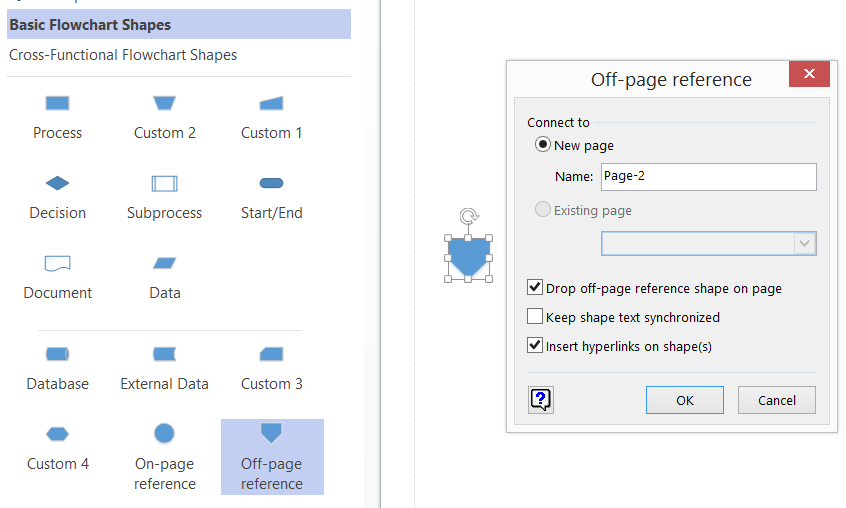
One of my favourite shapes in Visio is the Off-page reference shape on the Basic Flowchart Shapes stencil. I have written about this shape before ( see http://blog.bvisual.net/2011/09/02/page-grids-and-off-page-references/ ) but I did not notice a slight issue with it previously, so this article show how to overcome a couple of issues that I discovered whilst working on a project recently.

The shape is so useful for creating links between different pages and shapes within a Visio document (and can even be used to link between Visio documents), but it achieves this is a couple of ways. When dropped on to a page, it runs an add-on to prompt for the creation of a paired shape on an existing or new page.

image

[Read more…] about Making the Off-Page Reference Hyperlink URL Safe

Filed Under: Visio

  • « Go to Previous Page
  • Page 1
  • Interim pages omitted …
  • Page 46
  • Page 47
  • Page 48
  • Page 49
  • Page 50
  • Interim pages omitted …
  • Page 71
  • Go to Next Page »

Primary Sidebar

  • LinkedIn
  • Twitter

Recent Posts

  • Introducing a free Visio Report Runner application
  • Protecting the integrity of custom Visio masters
  • Docked Stencils in Visio for the Web
  • My Visio Books and Old pre-C# Work
  • Migrating from Lucidchart to Visio?

Categories

Tags

Accessibility Add-Ins AdvancedInstaller Connectors Containers Data Export Data Graphics Data Import Data Visualizer Educational Excel GraphDatabase Hyperlinks Icon Sets JavaScript LayerManager Layers Legend Link Data to Shapes MSIgnite Office365 Org Chart PowerApps PowerBI PowerQuery Processes Setup and Deployment Shape Data Shape Design ShapeSheet ShapeSheet Functions SharePoint 2013 SQL Teams Validation VBA Video Visio Visio 2007 Visio for the desktop Visio for the Web Visio Online Visio Services Visio Viewer Webinar

Footer

bVisual Profile

The UK-based independent Visio consultancy with a worldwide reach. We have over 25 years experience of providing data visualization solutions to companies around the globe.

Learn more about bVisual

  • Amazon
  • E-mail
  • Facebook
  • LinkedIn
  • Twitter
  • YouTube

Search this website

Recent posts

  • Introducing a free Visio Report Runner application
  • Protecting the integrity of custom Visio masters
  • Docked Stencils in Visio for the Web
  • My Visio Books and Old pre-C# Work
  • Migrating from Lucidchart to Visio?

Copyright © 2026 · Executive Pro on Genesis Framework · WordPress · Log in