• Skip to main content
  • Skip to primary sidebar
  • Skip to footer

bVisual

  • Home
  • Services
    • How Visio smartness can help your business
    • Visio visual in Power BI
    • Visio Consulting Services
    • Visio Bureau Services
    • Visio Training and Support Services
  • Products
    • Visio Shape Report Converter
    • SS Plus
    • LayerManager
    • visViewer
    • Metro Icons
    • Rules Tools for Visio
    • The Visio 2010 Sessions App
    • Multi-Language Text for Visio
    • Document Imager for Visio
    • multiSelect for Visio
    • pdSelect for Visio
  • Case Studies
    • Case studies overview
    • Using Visio in Education for GIS
    • Visualizing Construction Project Schedules
    • Visio Online Business Process Mapping
    • Nexans Visio Template
    • CNEE Projects, WorldCom
    • Chase Manhattan Bank
  • News
    • Recent news
    • News archive
  • Resources
    • Articles➡
      • ShapeSheet Functions A-Z
      • Comparing Visio for the Web and Desktop
      • Customising Visio Shapes for the Web App
      • Key differences between the Visio desktop and web apps
      • Using the Visio Data Visualizer in Excel
      • Using Visio in Teams
      • Creating Visio Tabs and Apps for Teams with SharePoint Framework (SPFx)
      • Designing Power Automate Flows with Microsoft Visio
      • Innovative uses of Visio Lists
    • Webcasts ➡
      • Visio in Organizations
      • My session and other Visio sessions at MSIgnite 2019
      • Power up your Visio diagrams
      • Vision up your Visio diagrams
      • The Visio 2010 MVP Sessions
    • Visio Web Learning Resources
    • Books➡
      • Visualize Complex Processes with Microsoft Visio
      • Mastering Data Visualization with Microsoft Visio
      • Microsoft Visio Business Process Diagramming and Validation
      • Visualizing Information with Microsoft Visio
  • Blog
    • Browse blog articles
    • Visio Power BI articles
    • Visio for Web articles
    • A history of messaging and encryption
  • About us
    • About bVisual
    • Testimonials
    • Bio of David Parker
    • Contact Us
    • Website Privacy Policy
    • Website terms and conditions
    • Ariba Network

Visio

Published on December 3, 2014 by David Parker

A Visio Deck of Cards

Sometimes I try ideas out in Visio without a specific goal in mind, and I have been creating a Visio deck of cards recently, so I thought I would share it. In fact, I have only created one card but it is capable of being any card in the deck by changing its shape data! I can even get a randomly generated card … all without any code except for formulas in the ShapeSheet.

Firstly, I used four icons for hearts, clubs, diamonds and spades, from my set of metro icons stencils ( see http://blog.bvisual.net/2012/11/20/announcing-metro-icons-and-a-windows-app-tile-shape-for-visio/ ). I decided to keep the icons for the suits separate, with four per suit, but linked their visibility to a Suit Shape Data fixed list row. I also displayed the Value Shape Data as the text of each icon.
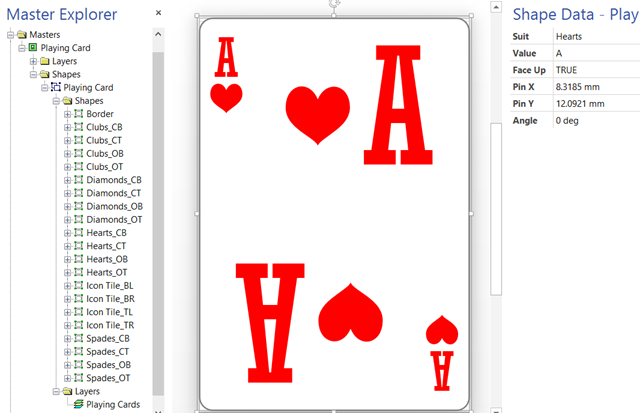
image

I added a Face Up Shape Data row so that the suit and value are hidden by the Microsoft Office logo.

[Read more…] about A Visio Deck of Cards
Filed Under: Games, Lists, Shape Reports, ShapeSheet Formulas, Visio 2013 Tagged With: Link Data to Shapes, Shape Data, ShapeSheet Functions

Published on December 1, 2014 by David Parker

Exposing the Visio Data Bars

Microsoft Visio Professional has had the ability to quickly visualize shape data with data graphics for a while now. This data can be displayed as Text, Data Bar, Icon Set or Color By Value. In an earlier article ( see http://blog.bvisual.net/2014/08/21/using-icon-sets-shapes-to-display-shape-data-values/ ), I showed how to enable the shapes in the Icon Sets stencil to be linked to data. Well, I had a similar request recently for the Data Bar shapes. However, Microsoft did not package the Data Bar shapes into a handy stencil, so I have done this for you.

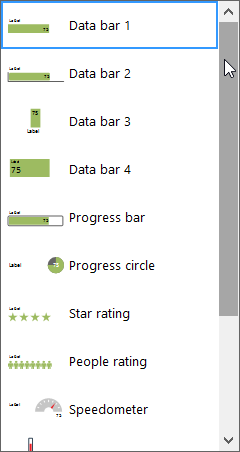
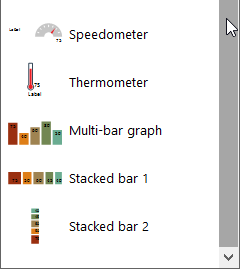
Firstly, a reminder of the thirteen built-in Data Bar shapes that are available to you when you choose to display data as a Data Graphics / Data Bar:

image

image

[Read more…] about Exposing the Visio Data Bars

Filed Under: Data Graphics, Visio 2013 Tagged With: Link Data to Shapes, Shape Data, Stencil

Published on November 18, 2014 by David Parker

Checking the Bitness of Microsoft Office, Visio Viewer and Visio

Visual Studio setup an deployment projects require the target “bitness” of target Windows operating system to be set. This means that I have to create two installation files, one for 32bit and one for 64bit Windows for my Visio add-ins, for example.

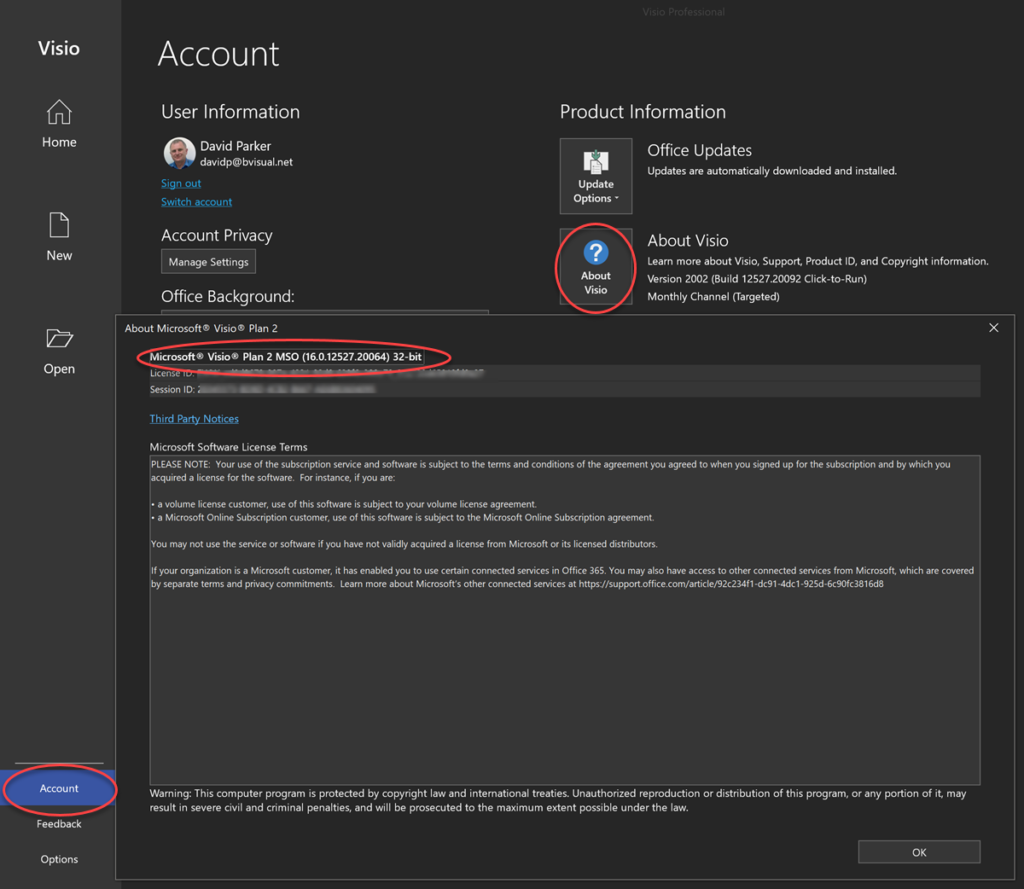
The bitness of an individual Visio application can be checked from the File / Account / About Visio dialog, and similar screens are available in other Office applications:

About Visio dialog

64bit Windows users can install either 32bit or 64bit Microsoft Office, which will install the relevant Visio Viewer package. The installed edition of Visio should then match the installed edition of Office.

Any Visio add-in installations need to match the bitness of the installed Visio application.

Filed Under: Deployment, Visio Tagged With: Visio Viewer

Published on November 14, 2014 by David Parker

Using SharePoint Rich Text Multiple Line Columns with Visio Services

Back in March, I wrote about mapping SharePoint Column Types to Visio Shape Data Types ( see http://blog.bvisual.net/2014/03/03/mapping-sharepoint-list-columns-to-visio-shape-data-types/ ), and I skipped over the remaining SharePoint column types that could not be directly mapped. In this article I describe some of the possibilities of using the SharePoint Rich Text option for the multi-line column type.

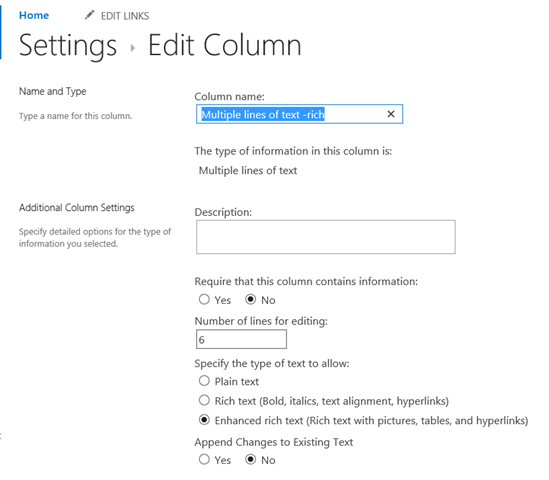
There are three different options for multiple lines of text columns in SharePoint 2013, so I tried the Enhanced rich text option because it allows for media and tables to be included.

image

[Read more…] about Using SharePoint Rich Text Multiple Line Columns with Visio Services

Filed Under: Visio 2013 Tagged With: SharePoint 2013, Visio Services

Published on October 10, 2014 by David Parker

Viewing Visio Documents in SharePoint through Outlook

This post comes with the sub-title “Now why didn’t I did know that!”. Sometimes it is easy not to see the wood for the trees, and this is one of those occurrences. I often get asked whether you need a Visio license to view Visio documents in a SharePoint document library. Well, no, but you do need a SharePoint Enterprise Client Access Licence to use Visio Services ( see http://office.microsoft.com/en-us/sharepoint/sharepoint-licensing-overview-collaboration-software-FX103789438.aspx ).
[Read more…] about Viewing Visio Documents in SharePoint through Outlook

Filed Under: SharePoint 2013, Visio 2013 Tagged With: Visio Services, Visio Viewer

Published on October 9, 2014 by David Parker

Using JavaScript to Find and Highlight Visio Shapes by Shape Data values in SharePoint Content Editor

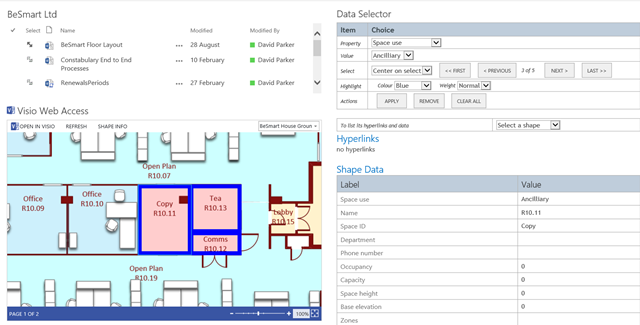
In August, I wrote about Using JavaScript to Display Visio Shape Data and Hyperlinks in SharePoint Content Editor ( see http://blog.bvisual.net/2014/08/16/using-javascript-to-display-visio-shape-data-and-hyperlinks-in-sharepoint-content-editor/ ), so now I have added the ability to select shapes by a property value. The main advantage of using JavaScript in the client is that there is no need to go back to the server to refresh the page.

In the following screenshot, I have used the standard web part connections between the BeSmart Ltd document library view and the Visio Web Access control in order to set the Drawing URL.

image

[Read more…] about Using JavaScript to Find and Highlight Visio Shapes by Shape Data values in SharePoint Content Editor

Filed Under: JavaScript, Shape Data, SharePoint, Visio 2013, Visio Services Tagged With: Shape Data, SharePoint 2013, Visio Services

  • « Go to Previous Page
  • Page 1
  • Interim pages omitted …
  • Page 43
  • Page 44
  • Page 45
  • Page 46
  • Page 47
  • Interim pages omitted …
  • Page 71
  • Go to Next Page »

Primary Sidebar

  • LinkedIn
  • Twitter

Recent Posts

  • Introducing a free Visio Report Runner application
  • Protecting the integrity of custom Visio masters
  • Docked Stencils in Visio for the Web
  • My Visio Books and Old pre-C# Work
  • Migrating from Lucidchart to Visio?

Categories

Tags

Accessibility Add-Ins AdvancedInstaller Connectors Containers Data Export Data Graphics Data Import Data Visualizer Educational Excel GraphDatabase Hyperlinks Icon Sets JavaScript LayerManager Layers Legend Link Data to Shapes MSIgnite Office365 Org Chart PowerApps PowerBI PowerQuery Processes Setup and Deployment Shape Data Shape Design ShapeSheet ShapeSheet Functions SharePoint 2013 SQL Teams Validation VBA Video Visio Visio 2007 Visio for the desktop Visio for the Web Visio Online Visio Services Visio Viewer Webinar

Footer

bVisual Profile

The UK-based independent Visio consultancy with a worldwide reach. We have over 25 years experience of providing data visualization solutions to companies around the globe.

Learn more about bVisual

  • Amazon
  • E-mail
  • Facebook
  • LinkedIn
  • Twitter
  • YouTube

Search this website

Recent posts

  • Introducing a free Visio Report Runner application
  • Protecting the integrity of custom Visio masters
  • Docked Stencils in Visio for the Web
  • My Visio Books and Old pre-C# Work
  • Migrating from Lucidchart to Visio?

Copyright © 2026 · Executive Pro on Genesis Framework · WordPress · Log in