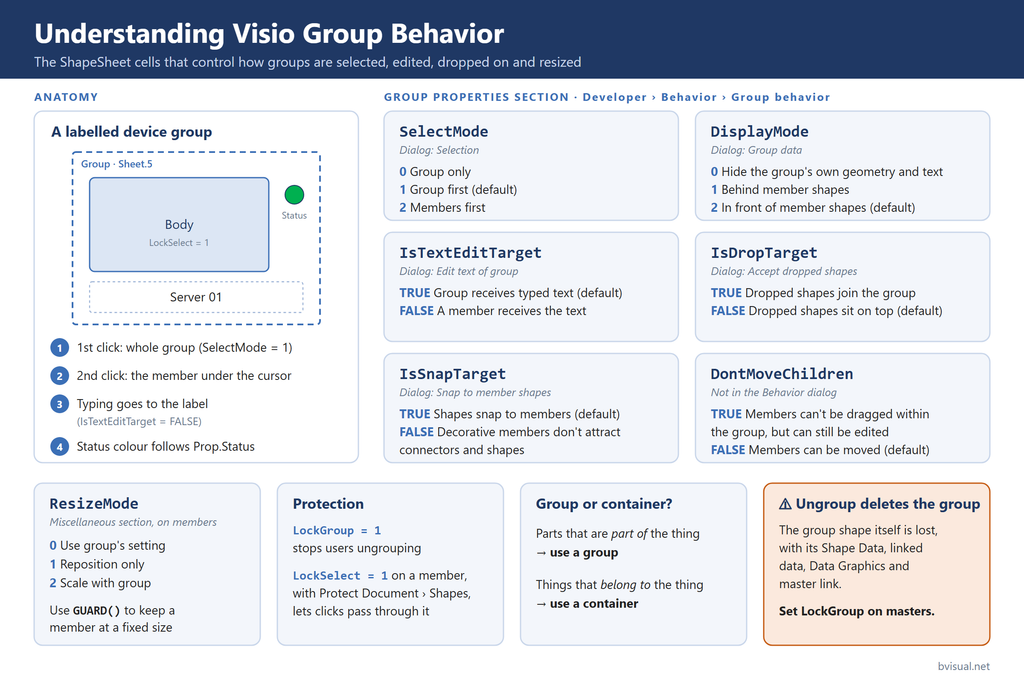
I have written many articles about Visio containers and lists over the years, but I realised that I have never written about their older, simpler cousin: the group. Groups are everywhere in Visio. A large proportion of the masters in the built-in stencils are groups. Yet I regularly see users (and developers) puzzled by why a click selects one thing and not another, why the text they type ends up in the wrong place, or why a shape they dropped onto a group either did or did not become part of it.
All of this is controlled by a handful of ShapeSheet cells, mainly in the Group Properties section, plus a couple of cells elsewhere. Once you understand them, you can design group shapes that behave exactly the way your users expect.