• Skip to main content
  • Skip to primary sidebar
  • Skip to footer

bVisual

  • Home
  • Services
    • How Visio smartness can help your business
    • Visio visual in Power BI
    • Visio Consulting Services
    • Visio Bureau Services
    • Visio Training and Support Services
  • Products
    • Visio Shape Report Converter
    • SS Plus
    • LayerManager
    • visViewer
    • Metro Icons
    • Rules Tools for Visio
    • The Visio 2010 Sessions App
    • Multi-Language Text for Visio
    • Document Imager for Visio
    • multiSelect for Visio
    • pdSelect for Visio
  • Case Studies
    • Case studies overview
    • Using Visio in Education for GIS
    • Visualizing Construction Project Schedules
    • Visio Online Business Process Mapping
    • Nexans Visio Template
    • CNEE Projects, WorldCom
    • Chase Manhattan Bank
  • News
    • Recent news
    • News archive
  • Resources
    • Articles➡
      • ShapeSheet Functions A-Z
      • Comparing Visio for the Web and Desktop
      • Customising Visio Shapes for the Web App
      • Key differences between the Visio desktop and web apps
      • Using the Visio Data Visualizer in Excel
      • Using Visio in Teams
      • Creating Visio Tabs and Apps for Teams with SharePoint Framework (SPFx)
      • Designing Power Automate Flows with Microsoft Visio
      • Innovative uses of Visio Lists
    • Webcasts ➡
      • Visio in Organizations
      • My session and other Visio sessions at MSIgnite 2019
      • Power up your Visio diagrams
      • Vision up your Visio diagrams
      • The Visio 2010 MVP Sessions
    • Visio Web Learning Resources
    • Books➡
      • Visualize Complex Processes with Microsoft Visio
      • Mastering Data Visualization with Microsoft Visio
      • Microsoft Visio Business Process Diagramming and Validation
      • Visualizing Information with Microsoft Visio
  • Blog
    • Browse blog articles
    • Visio Power BI articles
    • Visio for Web articles
    • A history of messaging and encryption
  • About us
    • About bVisual
    • Testimonials
    • Bio of David Parker
    • Contact Us
    • Website Privacy Policy
    • Website terms and conditions
    • Ariba Network

Visio

Published on March 18, 2015 by David Parker

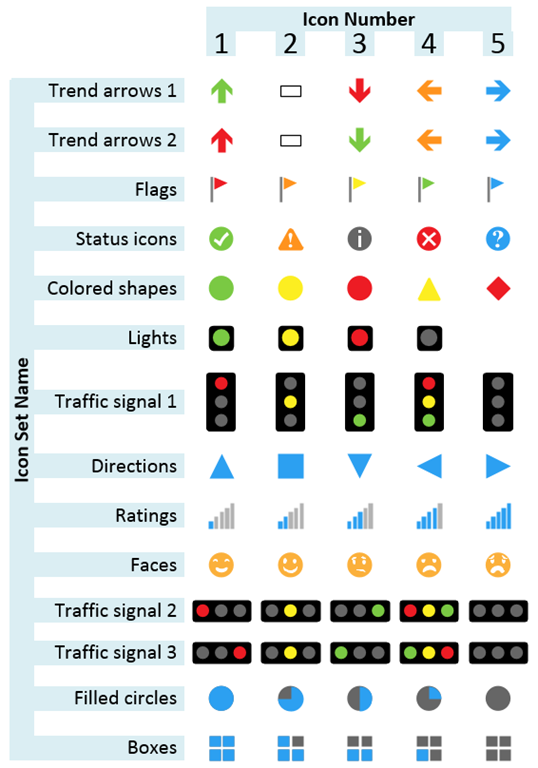
A Table of Visio Data Graphic Icon Sets

I have previously written blog articles about using, and extending, the Microsoft supplied Data Graphic Icons Sets, but I never explicitly listed their variations in a useful visual table. So, here is one:
image
[Read more…] about A Table of Visio Data Graphic Icon Sets

Filed Under: Data Graphics, Visio Tagged With: Data Graphics, Icon Sets, Visio 2013

Published on March 17, 2015 by David Parker

The history of Visio

I have been a dedicated user and developer of Visio since 1996 when I got a week-long developer training course presented by Dave Edson (see http://vizfirst.sharepoint.com/Pages/MrDavidAEdsonCEO.aspx ) and Mark Davison in Paris. Previous to that, I had been working with CAD and databases (or spread sheets), but I had noticed either version 1 or 2 of Visio on a computer mag cover disk, and earmarked it for future investigation.

We have recently been made aware that Ted Johnson, one of the original founders, has a website with the history of Visio up to the acquisition by Microsoft in 1999 ( see http://www.visiocorp.info ). It is fascinating reading, and there are lots of faces that I met there, plus some that you should still be aware of ( eg Chris Roth, aka VisGuy http://www.visguy.com/ ).


Visio is a unique product, and the story of Visio shows that it is a well-loved one, with an enthusiastic team behind it, and an watchful community eager to see it further develop!

Filed Under: MVP, Visio

Published on March 13, 2015 by David Parker

Updating the file path of data linked Excel tables in Visio

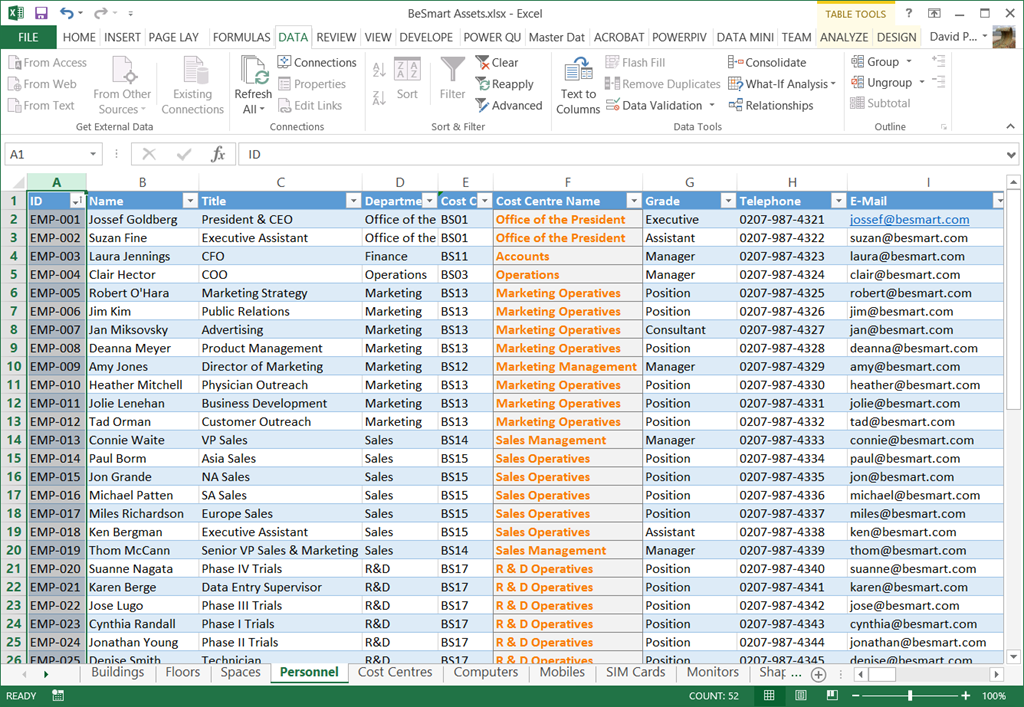
Link Data to Shapes in Visio (not the Standard edition though) is great for visualizing information, and I often use a multi-worksheet Excel workbook that I create locally, and then wish to re-link to a copy of the workbook elsewhere, or even in Office365. This is a simple task if there are only one or two Excel tables involved, but can become tedious when there are many. So, this blog is presents an semi-automated method of achieving this.

Firstly I have an Excel workbook that I have many worksheets with tables of data on them. I named each worksheet, and used the Format As Table command on each.
image
[Read more…] about Updating the file path of data linked Excel tables in Visio

Filed Under: Excel, External Data, VBA, Visio 2010, Visio 2013, Visio Services Tagged With: Excel, Link Data to Shapes, Visio

Published on February 10, 2015 by David Parker

Displaying SharePoint Document Library Column Values on Visio Services Diagrams

It is often useful to be able to link text or graphics to the values in the SharePoint document library that a Visio diagram is stored in. A SharePoint Document library is just a list with columns and Visio 2013 documents can be linked to the data in SharePoint lists … and it will be automatically refreshable. This means that Approval Status changes, for example, can be displayed as text or icons. This article goes through the methodology of linking data from the SharePoint document library to the Visio document.

[Read more…] about Displaying SharePoint Document Library Column Values on Visio Services Diagrams

Filed Under: SharePoint 2013, Visio 2013 Tagged With: Visio Services

Published on February 3, 2015 by David Parker

Visio for Mac ? Well, not really ….

My fellow Visio MVP, John Marshall (see https://johnvisiomvp.wordpress.com), pointed out recently that Lucid Software claim to have a Visio for Mac application that offers import and export of real Visio files. Well, although I would love to have a web-edition of Visio from Microsoft, I was interested to discover if the claims are true … so I signed up for a trial. I present my findings below, based on just one Visio document that I have used in this blog before ( see http://blog.bvisual.net/2013/07/08/mvp-sessions-for-getting-started-with-visio-2010/ ). My conclusion is if you use Visio for high quality vector graphics or for any type of business intelligence then wait for Microsoft to do it right! Please do not even consider round tripping Visio files to Lucidcharts and back, because you will be extremely disappointed.

[Read more…] about Visio for Mac ? Well, not really ….

Filed Under: Visio, Visio 2010, Visio 2013, Visio for Web

Published on January 25, 2015 by David Parker

Using SharePoint Choice Columns with Visio Services

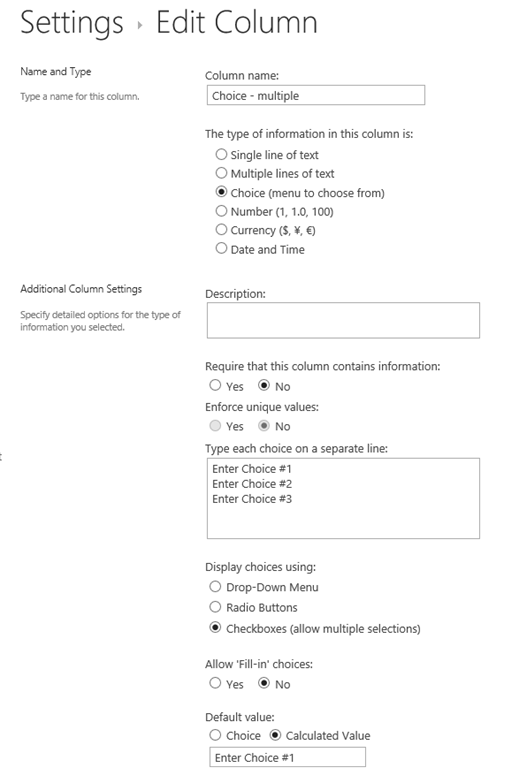
Back in March 2014, I wrote about mapping SharePoint Column Types to Visio Shape Data Types ( see http://blog.bvisual.net/2014/03/03/mapping-sharepoint-list-columns-to-visio-shape-data-types/ ), and I skipped over the remaining SharePoint column types that could not be directly mapped. I described Rich Text previously ( see http://blog.bvisual.net/2014/11/14/using-sharepoint-rich-text-multiple-line-columns-with-visio-services/ ), and in this article I describe some of the possibilities of using the SharePoint Choice column type.

There are three different options for Choice columns in SharePoint 2013, but only the third, Checkboxes, allows for multiple selections.
image
[Read more…] about Using SharePoint Choice Columns with Visio Services

Filed Under: External Data, Shape Data, ShapeSheet Formulas, SharePoint, Visio 2013 Tagged With: SharePoint 2013, Visio Services

  • « Go to Previous Page
  • Page 1
  • Interim pages omitted …
  • Page 41
  • Page 42
  • Page 43
  • Page 44
  • Page 45
  • Interim pages omitted …
  • Page 71
  • Go to Next Page »

Primary Sidebar

  • LinkedIn
  • Twitter

Recent Posts

  • Introducing a free Visio Report Runner application
  • Protecting the integrity of custom Visio masters
  • Docked Stencils in Visio for the Web
  • My Visio Books and Old pre-C# Work
  • Migrating from Lucidchart to Visio?

Categories

Tags

Accessibility Add-Ins AdvancedInstaller Connectors Containers Data Export Data Graphics Data Import Data Visualizer Educational Excel GraphDatabase Hyperlinks Icon Sets JavaScript LayerManager Layers Legend Link Data to Shapes MSIgnite Office365 Org Chart PowerApps PowerBI PowerQuery Processes Setup and Deployment Shape Data Shape Design ShapeSheet ShapeSheet Functions SharePoint 2013 SQL Teams Validation VBA Video Visio Visio 2007 Visio for the desktop Visio for the Web Visio Online Visio Services Visio Viewer Webinar

Footer

bVisual Profile

The UK-based independent Visio consultancy with a worldwide reach. We have over 25 years experience of providing data visualization solutions to companies around the globe.

Learn more about bVisual

  • Amazon
  • E-mail
  • Facebook
  • LinkedIn
  • Twitter
  • YouTube

Search this website

Recent posts

  • Introducing a free Visio Report Runner application
  • Protecting the integrity of custom Visio masters
  • Docked Stencils in Visio for the Web
  • My Visio Books and Old pre-C# Work
  • Migrating from Lucidchart to Visio?

Copyright © 2026 · Executive Pro on Genesis Framework · WordPress · Log in