My latest book, which is about validating diagrams in Visio 2010 ( https://www.packtpub.com/microsoft-visio-2010-business-process-diagramming/book ) was published by Packt Publishing last year.
You can get 25% off during January, if you buy more than one Microsoft book from them. Please read the details at https://www.packtpub.com/article/microsoft-books .
Visio
Preparing for Visio Web Access control events
The Visio Web Access (VWA) web part for SharePoint 2010 can be used to display and interact with Visio documents. The VWA web part includes a Shape Information pane that can be used to display the hyperlinks and shape data of each Visio shape. This article describes how to control the information that appears in this pane.
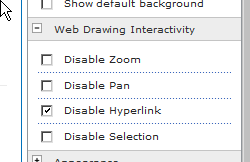
The Visio Web Access web part for SharePoint 2010 itself has the ability to inhibit interaction with hyperlinks or shape selection by using the Edit Web Part properties panel.
The hyperlinks of a shape can still be available from the Shape Informtion pane, if you have not hidden it.
Active hyperlinks on a shape can get in the way of selecting it in the VWA web part, so Disable Hyperlink is usually required.
[Read more…] about Preparing for Visio Web Access control events
Language Support in Visio 2010
I was recently asked to provide the ability to store multiple language shape text and page names in Visio 2010. An interesting request that has inspired me create a useful add-in for Visio 2010 (Multi-Language Text for Visio coming soon), and prompted me to investigate language support in Visio 2010. I have written Visio add-ins that have needed to work in several different language editions of Visio before, and have been aware of the special considerations in creating ShapeSheet formulae, but this is more about supporting different languages in the same edition of Visio … and I was surprised how good this feature is!
New MSDN Article : Introduction to Validation Rules in Visio Premium 2010
I was planning to write a quick blog today, but it seems that Microsoft have moved all spaces.live.com bloggers to WordPress! Another new tool to learn ….
In the meantime, I am pleased to announce that Microsoft have just published an article that I have written at http://msdn.microsoft.com/en-us/library/ff847470.aspx
This article goes through the new diagram validation feature in Microsoft Visio Premium 2010 and shows you how to use the Validation API to create your own rules and rule sets to validate Visio 2010 diagrams.
Of course, those of you who wish to delve deeper could always buy my book from all good bookstores – see http://www.visiorules.com
A Patch Panel that can be 1U too
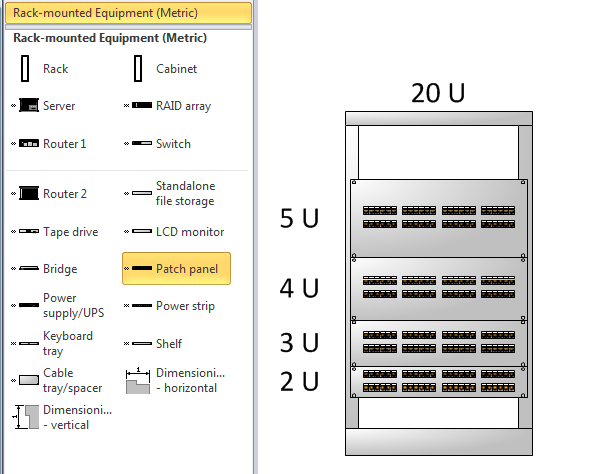
Microsoft Visio 2007 Professional and 2010 Professional and Premium includes the Network / Rack Diagram template, which opens the Rack-mounted equipment stencil. This stencil includes the Patch Panel master which can be stretched from 2U to 25U high. However, I have often required a 1U patch Panel, so I decided to look into the Microsoft shape to see if it could be modified to allow it to be reduced to 1U without looking ridiculous.
visViewer 3rd Edition released
Microsoft recently updated the free Microsoft Visio Viewer (see http://www.microsoft.com/downloads/details.aspx?displaylang=en&FamilyID=f9ed50b0-c7df-4fb8-89f8-db2932e624f7 ). I have updated visViewer (see http://www.bvisual.net/Products/visViewer.aspx ) to use the new version of the Microsoft Visio Viewer which now enables you to view all versions of Visio documents from Visio 5 to Visio 2010 without having Visio installed.
One of the cool things about the Microsoft Visio Viewer is its ability to view reviewer’s markup. Here is an example of a document in Visio with reviewer’s comments:

Here is the same document in bVisual visViewer:

Useful!