• Skip to main content
  • Skip to primary sidebar
  • Skip to footer

bVisual

  • Home
  • Services
    • How Visio smartness can help your business
    • Visio visual in Power BI
    • Visio Consulting Services
    • Visio Bureau Services
    • Visio Training and Support Services
  • Products
    • Visio Shape Report Converter
    • SS Plus
    • LayerManager
    • visViewer
    • Metro Icons
    • Rules Tools for Visio
    • The Visio 2010 Sessions App
    • Multi-Language Text for Visio
    • Document Imager for Visio
    • multiSelect for Visio
    • pdSelect for Visio
  • Case Studies
    • Case studies overview
    • Using Visio in Education for GIS
    • Visualizing Construction Project Schedules
    • Visio Online Business Process Mapping
    • Nexans Visio Template
    • CNEE Projects, WorldCom
    • Chase Manhattan Bank
  • News
    • Recent news
    • News archive
  • Resources
    • Articles➡
      • ShapeSheet Functions A-Z
      • Comparing Visio for the Web and Desktop
      • Customising Visio Shapes for the Web App
      • Key differences between the Visio desktop and web apps
      • Using the Visio Data Visualizer in Excel
      • Using Visio in Teams
      • Creating Visio Tabs and Apps for Teams with SharePoint Framework (SPFx)
      • Designing Power Automate Flows with Microsoft Visio
      • Innovative uses of Visio Lists
    • Webcasts ➡
      • Visio in Organizations
      • My session and other Visio sessions at MSIgnite 2019
      • Power up your Visio diagrams
      • Vision up your Visio diagrams
      • The Visio 2010 MVP Sessions
    • Visio Web Learning Resources
    • Books➡
      • Visualize Complex Processes with Microsoft Visio
      • Mastering Data Visualization with Microsoft Visio
      • Microsoft Visio Business Process Diagramming and Validation
      • Visualizing Information with Microsoft Visio
  • Blog
    • Browse blog articles
    • Visio Power BI articles
    • Visio for Web articles
    • A history of messaging and encryption
  • About us
    • About bVisual
    • Testimonials
    • Bio of David Parker
    • Contact Us
    • Website Privacy Policy
    • Website terms and conditions
    • Ariba Network

Master Shortcuts

Published on September 1, 2025 by David Parker

Are Master Shortcuts useful in Visio?

Many Visio users may not even understand the question, but this almost hidden feature has been available for many years. A Master Shortcut looks like a normal Master in a stencil, but it is merely holds a reference to another Master in a Stencil, not necessarily the same one, and has an option to add actions that can change properties of the target Master when it is dropped on the page. The advantage is that the shapes on the page are still instances of the target Master in the document which makes customisation and maintenance much easier. So, why would you use them?

One good reason is that you are providing a custom stencil, but you want to include some of the built-in Microsoft ones. Just including a Master Shortcut to the Microsoft Stencil and Master does not break any copyright laws that I am aware of.

Another good reason is that many users prefer to just drag’n’drop a Master from a Stencil rather than further mouse clicks to configure the dropped shape with the Shape Data window or the right mouse actions.

This article describes how to use Master Shortcuts using BPMN shapes as an example.
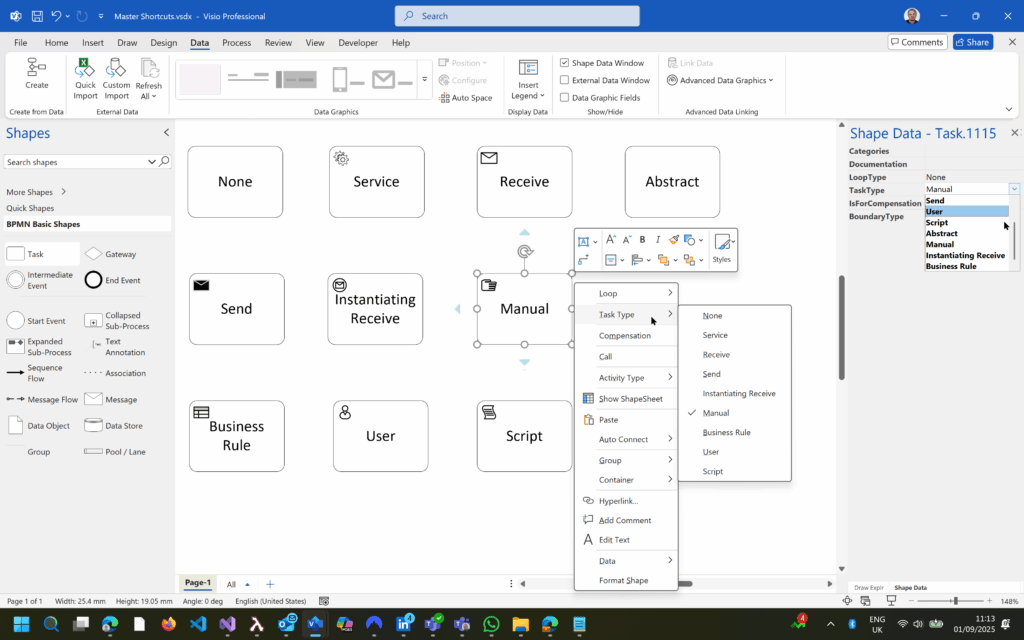
  • The BPMN Task has 10 types available from Shape Data window and context menu
  • Copy Master then Paste Shortcut into an editable Stencil
  • Edit Master Shortcut Properties and rename, then copy/paste as required
  • Multiple Master Shortcuts but only one Master
[Read more…] about Are Master Shortcuts useful in Visio?

Filed Under: Actions, Shape Data, Shape Design, Visio for Desktop Tagged With: Master Shortcuts, Visio for the desktop

Primary Sidebar

  • LinkedIn
  • Twitter

Recent Posts

  • How SVG in Visio can cause a Shape.BoundingBox(…) error
  • Post-Processing Paste from Clipboard in Visio
  • Are Master Shortcuts useful in Visio?
  • Jumping between Shapes in Visio
  • Co-authoring and Commenting with Visio Documents

Categories

Tags

Accessibility Add-Ins Connectors Containers Data Export Data Graphics Data Import Data Visualizer Educational Excel GraphDatabase Hyperlinks Icon Sets JavaScript LayerManager Layers Legend Link Data to Shapes Lists MSIgnite MVP Office365 Org Chart PowerApps PowerBI PowerQuery Processes Shape Data Shape Design ShapeSheet ShapeSheet Functions SharePoint 2013 SQL Teams Validation VBA Video Visio Visio 2007 Visio for the desktop Visio for the Web Visio Online Visio Services Visio Viewer Webinar

Footer

bVisual Profile

The UK-based independent Visio consultancy with a worldwide reach. We have over 25 years experience of providing data visualization solutions to companies around the globe.

Learn more about bVisual

  • Amazon
  • E-mail
  • Facebook
  • LinkedIn
  • Twitter
  • YouTube

Search this website

Recent posts

  • How SVG in Visio can cause a Shape.BoundingBox(…) error
  • Post-Processing Paste from Clipboard in Visio
  • Are Master Shortcuts useful in Visio?
  • Jumping between Shapes in Visio
  • Co-authoring and Commenting with Visio Documents

Copyright © 2025 · Executive Pro on Genesis Framework · WordPress · Log in